

Beskriuwing
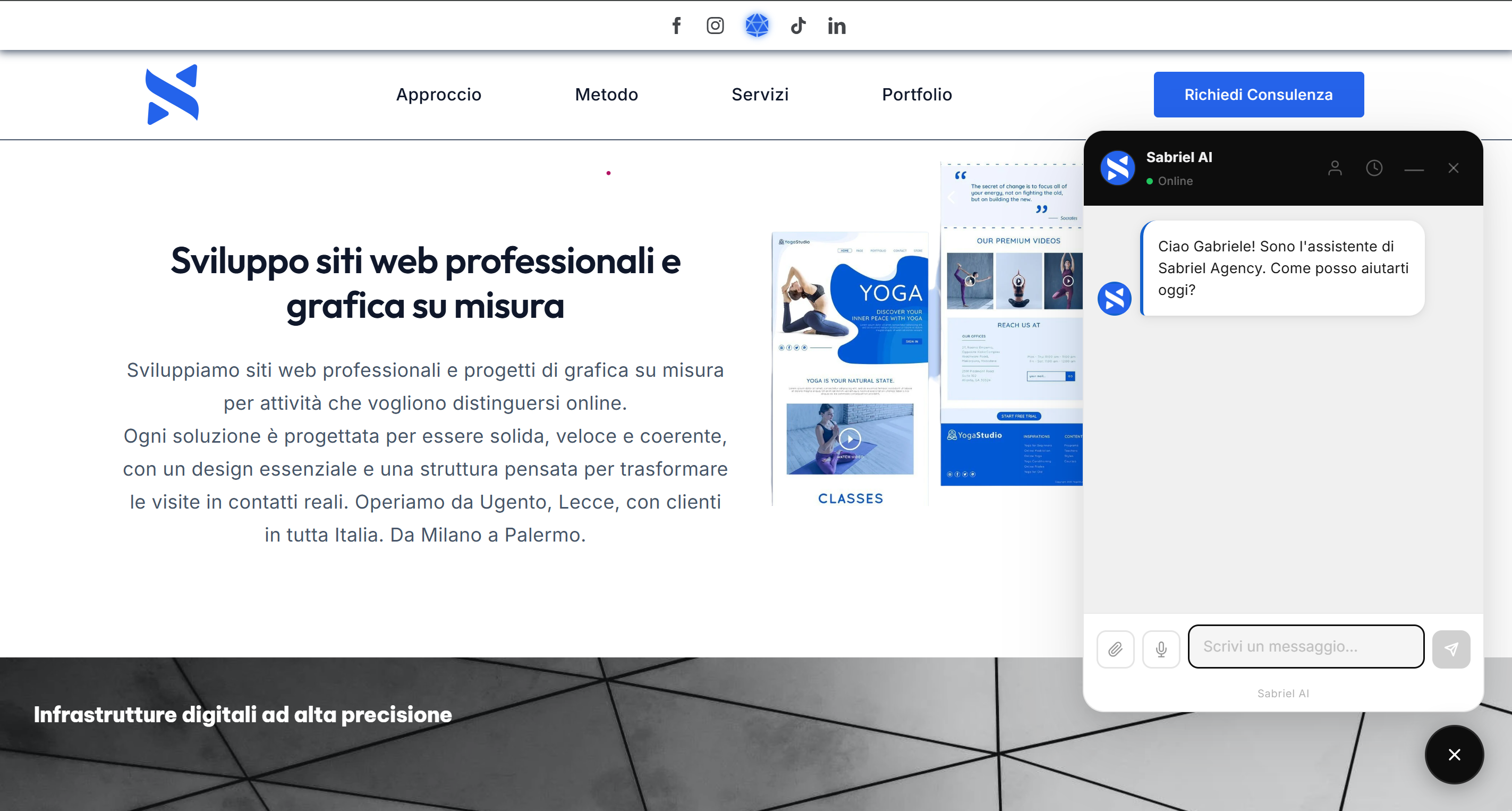
Sabriel AI puts a real AI assistant on your site, styled to look like it was built for your brand, not like a widget you bolted on.
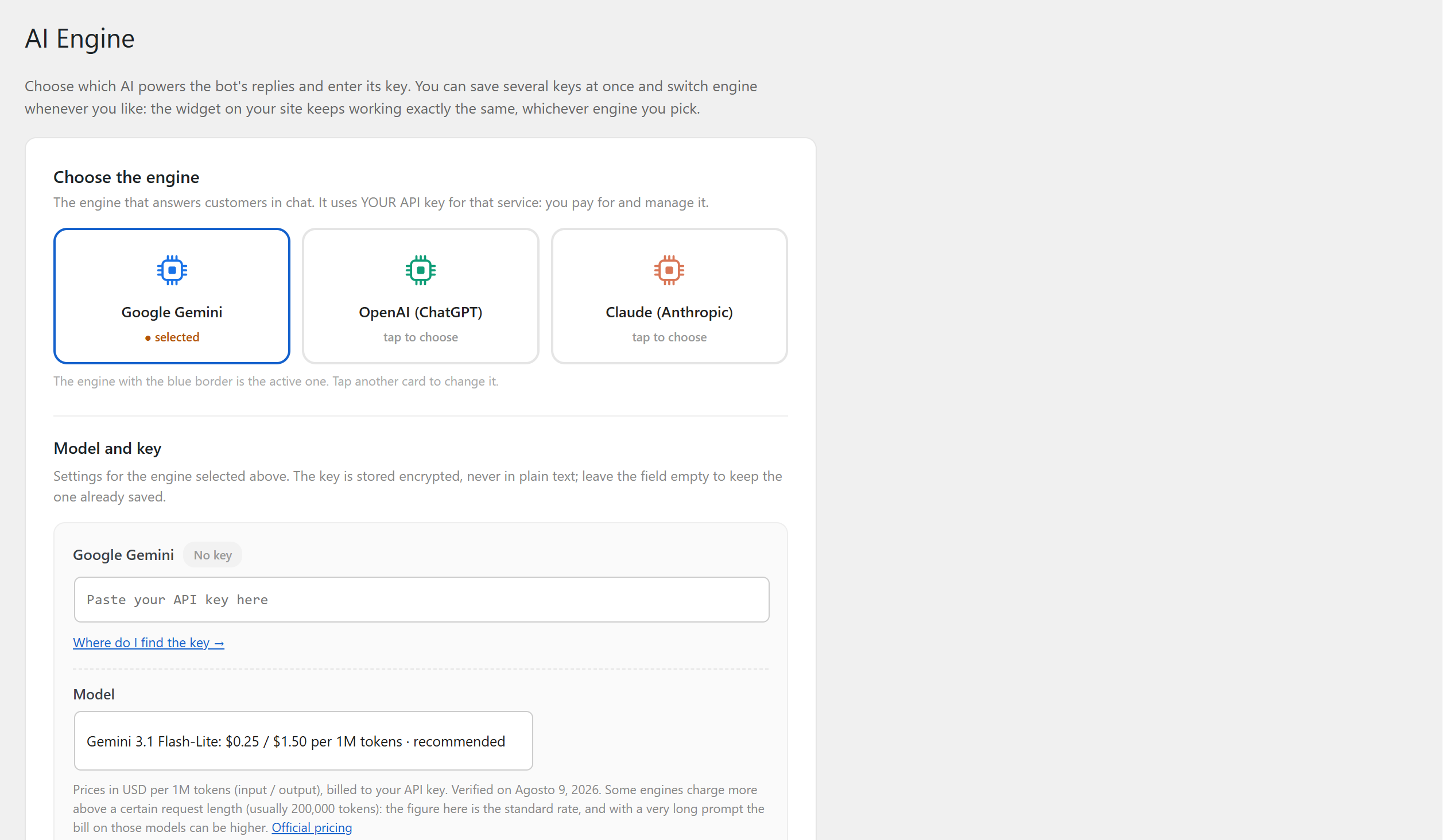
You connect your own API key for Google Gemini, OpenAI or Anthropic Claude. The key is stored encrypted on your site (the System status page confirms that your server supports it) and is only ever sent to the provider you chose. There is no account to create, no service in the middle, and no data of yours passes through us.
What the assistant can do
- Answer questions about your business, using the details and the price list you enter in the settings
- Speak the language your visitor writes in, and switch mid-conversation if they do
- Read images your visitor attaches, and PDFs too when the engine you picked supports them
- Take voice messages: the visitor speaks instead of typing, and only the text reaches your site and the assistant. The speech is turned into text by the visitor’s own browser, which usually does it on its maker’s servers (Google for Chrome, Microsoft for Edge, Apple for Safari)
- Know your opening hours, and tell a visitor writing at 11pm that you are closed instead of letting them wait
- Give prices in your currency, with your VAT rate, your deposit and your installment terms, exactly as you set them
- Hand the conversation over to a person, with the message already written. The WhatsApp button carries a short briefing the assistant writes on the spot (who is writing, what they were asking, where the conversation had got to) falling back to their last three messages if the engine is slow. The email button opens a message with the conversation already transcribed inside it, trimmed if the chat was very long, because mail links have a length limit that is not ours. The phone button dials the number you set, if you set one
- Take a written message when nobody is available, from a box inside the chat itself: it reaches your inbox through your own site, without the visitor having to open their mail program
- Email the visitor a tidy summary of the conversation when they leave, and notify you at the same time
- Recognize a visitor who comes back from the same device, and pick up from what you already talked about
What you get in the admin panel
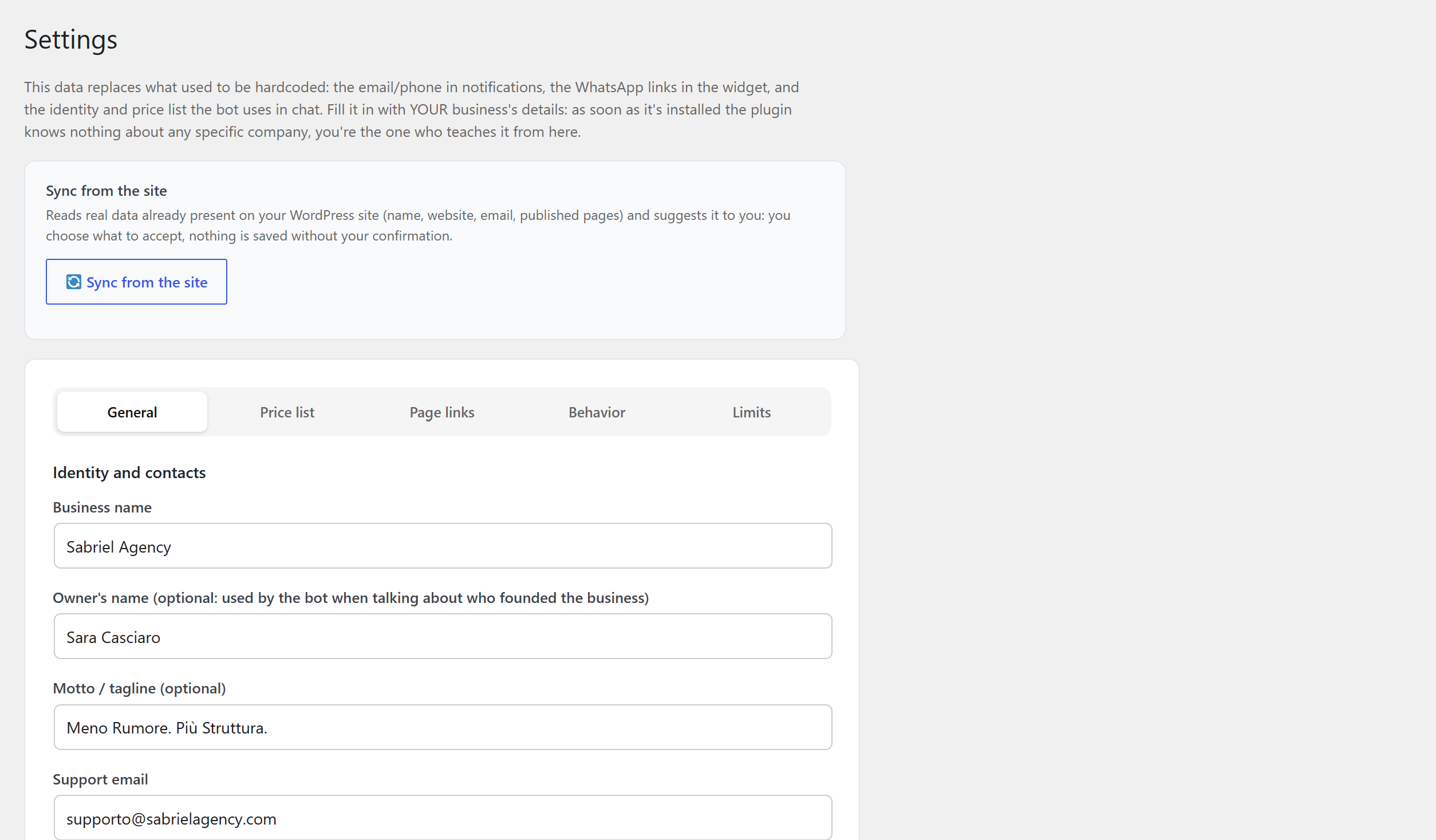
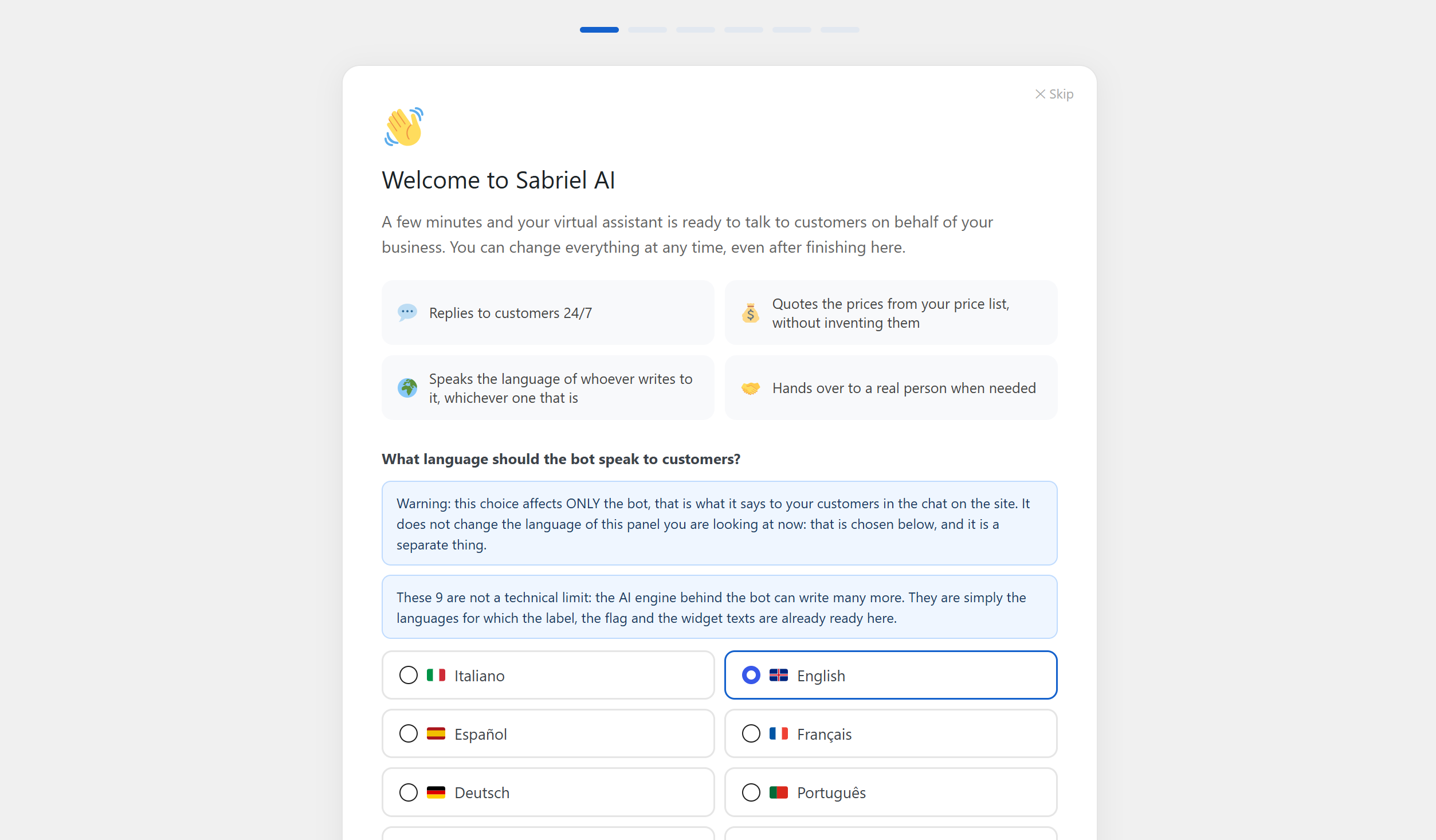
- A setup wizard that does the boring part. It reads your homepage with the AI you just connected and suggests a tagline and a tone of voice for your assistant. It also pulls your business name, website and email straight from WordPress, and your address from WooCommerce if you have it. You approve what you want and skip the rest.
- Seven ready-made tones (e-commerce, professional practice, salon, restaurant, medical practice, craftsperson, estate agency) as a starting point you then edit in your own words.
- A dashboard with visits, unique visitors, chats opened, daily average, blocked abuse attempts and your most visited pages, over the last 30 days. Counted on your own site, without cookies.
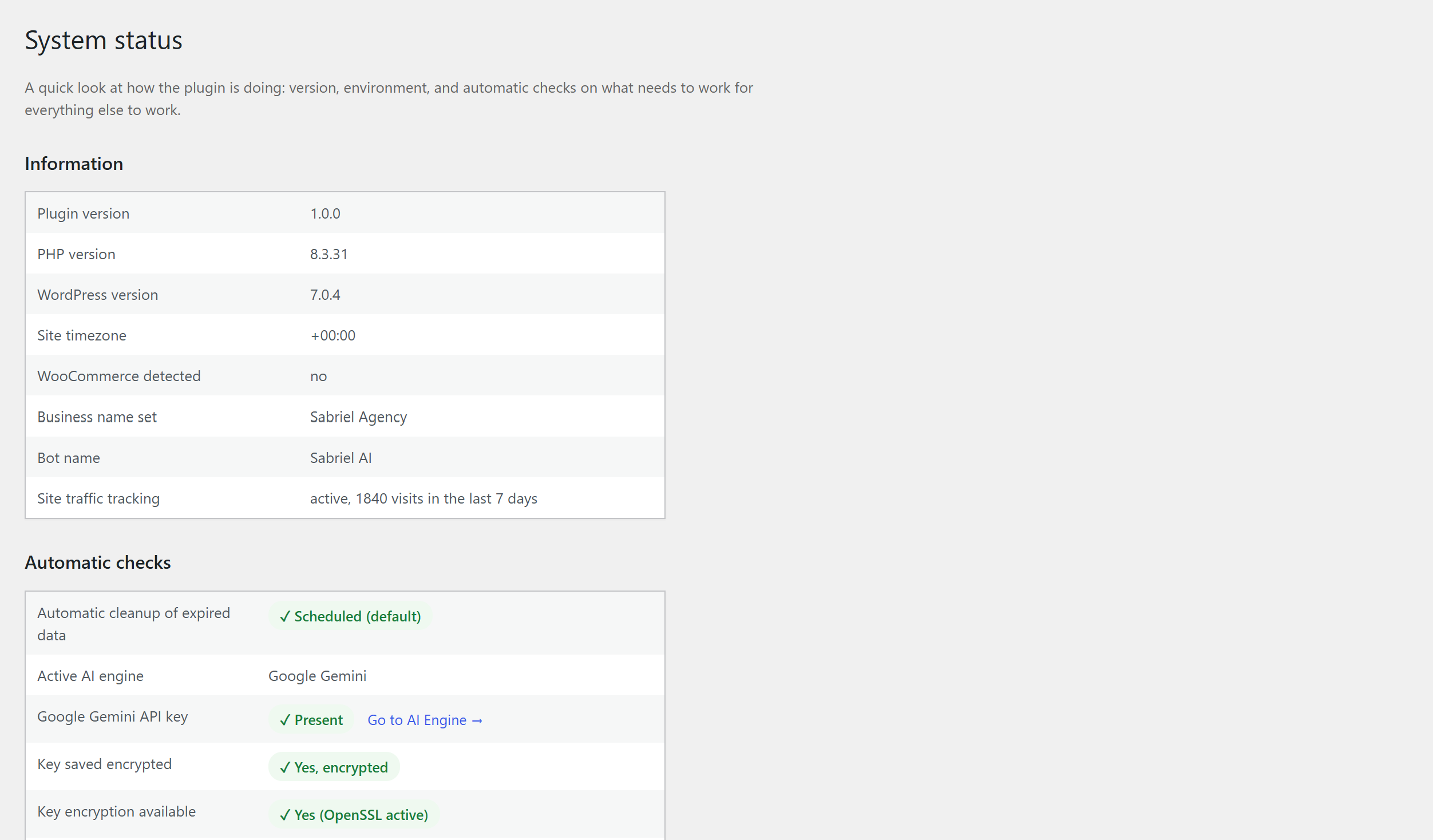
- A system status page that checks the things that actually break: whether your key is readable, whether the server can encrypt it, whether your site can send email at all. With a real test button for each.
- Export and import of the whole configuration, to move a finished setup onto the next site.
What you control
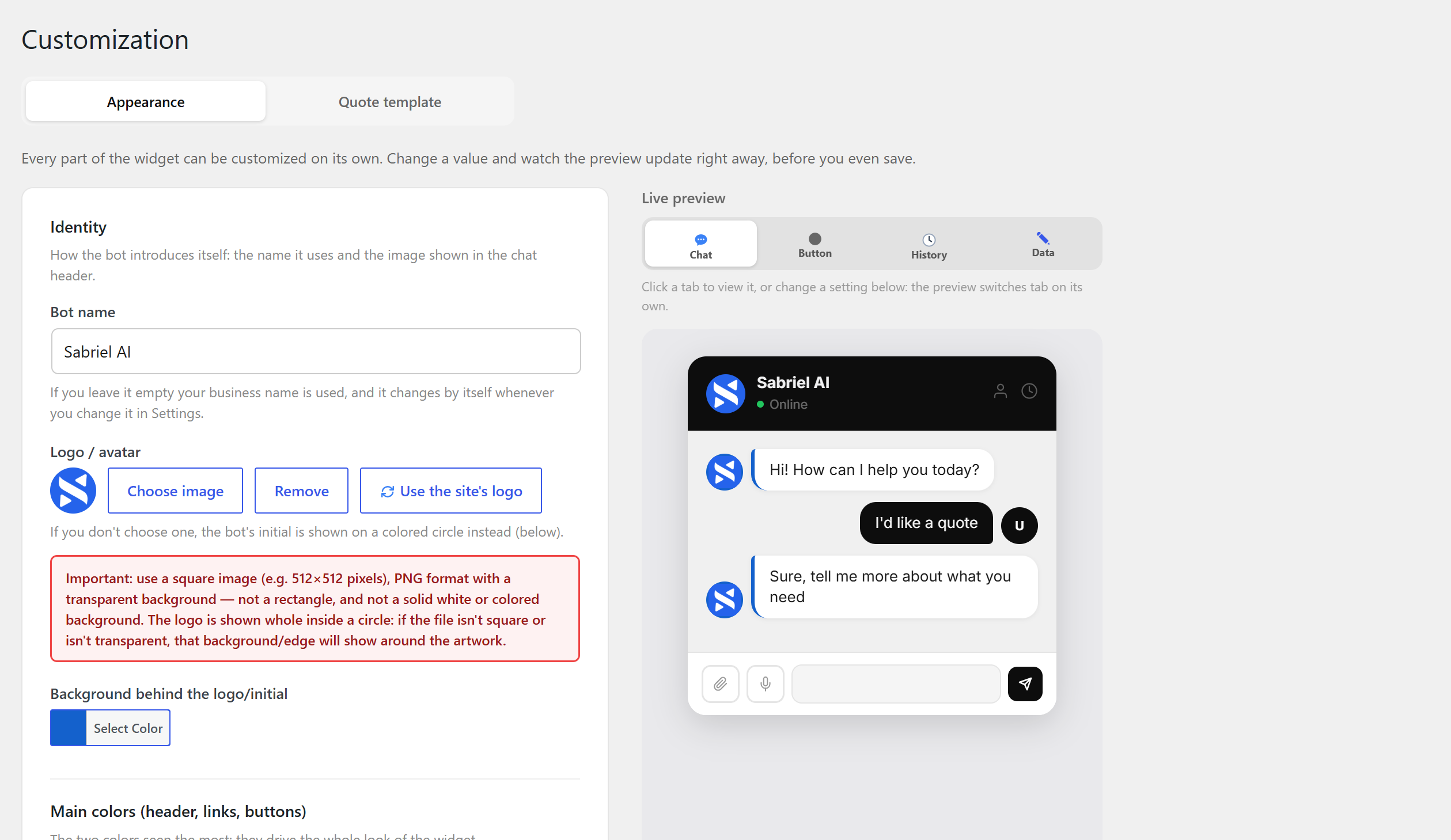
- Your brand. Logo, bot name and the widget’s main colors, with a live preview while you pick them. No credit of ours appears unless you choose to switch it on.
- Behavior and tone. A plain-text field where you tell the assistant how to talk and what your rules are: including the things that change from one day to the next: closed this evening for a private party, ten percent off this week, a dish that has run out. Whatever you write there, the assistant knows and says.
- Your price list. One row per service, with price and short description. The assistant quotes from it instead of inventing numbers.
- Opening hours, including shifts that cross midnight: the plugin splits them across the two days by itself.
- Currency and VAT, by country, with the rate filled in for you, and your deposit/balance structure.
- Links to your pages. The assistant cites them naturally when they are relevant, and never invents an address that does not exist.
- Anti-abuse limits. How many messages one visitor gets in 24 hours (a number you set, not one we impose) how many conversation summaries a single address can receive in an hour, and disposable email addresses turned away.
Nine languages, out of the box
Italian, English, Spanish, French, German, Portuguese, Dutch, Russian and Indonesian: for both the assistant and the admin panel, and they can be different from each other. There is also a single switch, «the bot speaks every language», that frees the assistant from your choice altogether: it then answers in whatever language each visitor writes in, whichever one that is.
Documentation inside the plugin
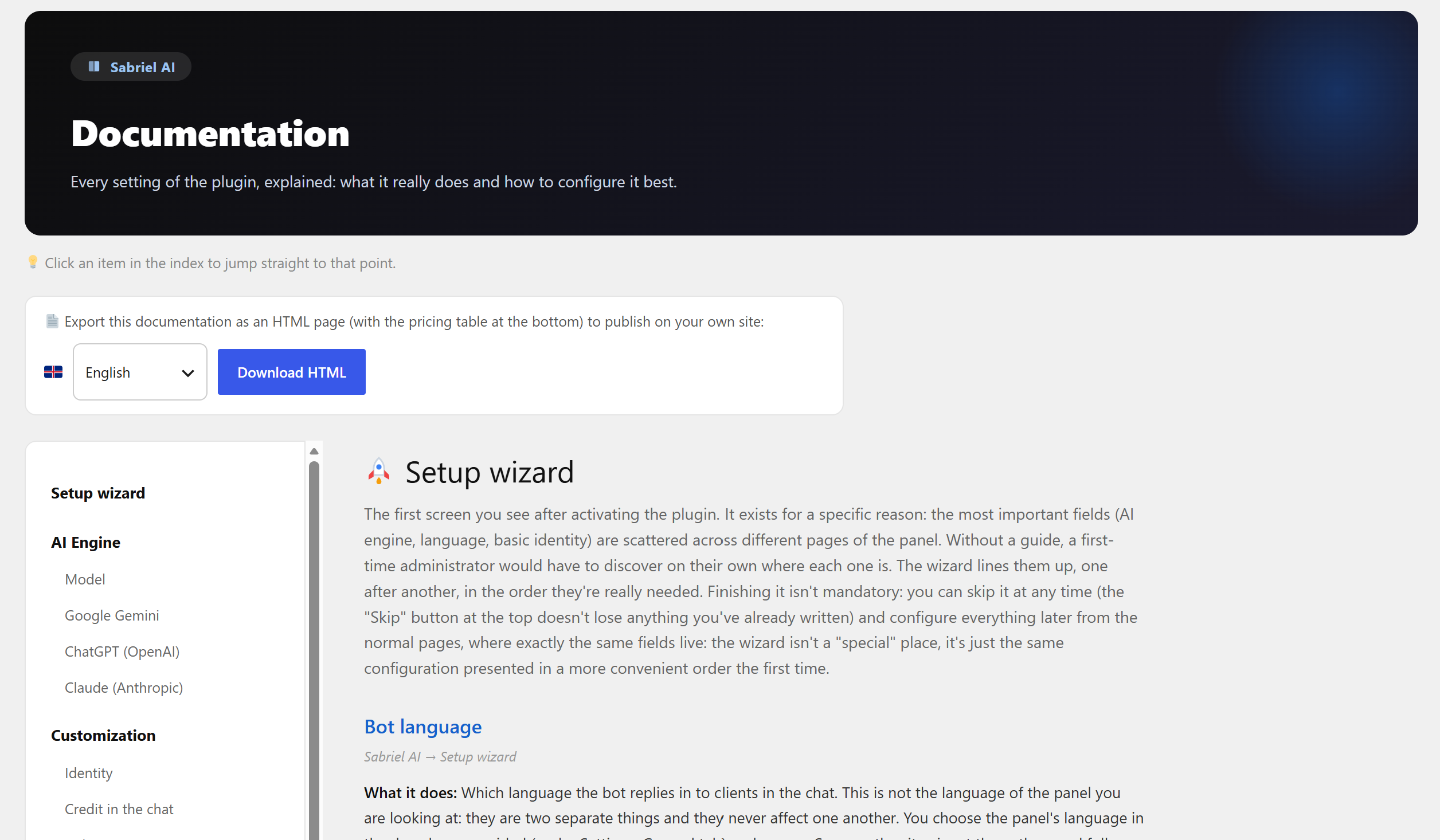
There is a full Documentation page in the admin menu, in all nine languages, with live previews that reflect your actual configuration. You can also export it as a single HTML file, in the language you pick, and publish it on your own site for your team.
A larger version exists
A paid edition adds, on top of everything above:
- Appointment booking inside the chat, on a calendar of its own, no Google Calendar, no Calendly, no third-party account. It knows your opening hours, how many people fit in each slot and the gap you want between one appointment and the next, and it will not double-book.
- Numbered PDF quotes with space for a signature, issued during the conversation, carrying your logo and your own terms and conditions.
- Lead scoring: every conversation is classified hot, warm or cold with a one-line reason, recalculated whenever the person writes again. Follow-up emails then go out on their own schedule, sent from your own site, each carrying an unsubscribe link, and they stop by themselves as soon as the person has an appointment booked.
- A free website check the assistant can run for a visitor and hand back as a report: built for web agencies, it looks at what is publicly visible (speed, mobile rendering, headings and metadata, images, security headers, broken links and more) and turns it into a conversation starter instead of a cold quote.
- Portfolio and products inside the chat, from wherever you already keep them: WooCommerce, a page of your own, a list you write by hand, your blog, or the portfolio your theme already provides. No rebuilding of a catalog you have built once already.
- Knowledge of your site’s pages, so the assistant answers from what is actually written on them: nothing to embed, no external index, no snippet to paste anywhere. It reads the pages you select, writes its own summary of each, and that summary is yours to correct.
- Client management dashboard: appointments, quotes, checks, analytics and consents in one place.
- Recoverable history: a visitor keeps the conversation moving from phone to laptop.
- Mailchimp synchronization with double opt-in.
- Wider anti-abuse limits, and far more room for customization: over thirty colors and nine font families.
- Native GDPR tools. Appointments and quotes plug straight into WordPress’s own Export Personal Data and Erase Personal Data tools, so a visitor’s “send me my data” or “delete me” request is one click, not a manual database search. Appointments and quotes are anonymized rather than deleted outright, since many countries require you to keep financial records; conversations are deleted in full.
- Site hardening, in one panel. Nine switches (disable XML-RPC, hide the WordPress version, block user enumeration, limit login attempts, security headers, disable the file editor, hide your readme.txt, hide or move your login page) so you are not installing a second plugin just to close the basics.
Nothing here is locked. The paid edition is a separate plugin, not a key that unlocks code you already downloaded: none of the features listed above ship inside this one.
It is not required and this plugin does not nag you about it: everything described above works on its own, for everyone, forever. Details are on a single page inside the plugin, and at https://sabrielagency.com/sabriel-ai-en/
External services
This plugin connects to one external service, the AI provider you choose and configure. Nothing is sent to an AI provider until you save an API key for it, and only the provider selected as active is used (“Test this key” contacts the provider whose key you are testing).
The AI provider you choose. The plugin calls the provider’s API over HTTPS with your own API key:
- Google Gemini (generativelanguage.googleapis.com): terms https://ai.google.dev/gemini-api/terms | privacy https://policies.google.com/privacy
- OpenAI (api.openai.com): terms https://openai.com/policies/ | privacy https://openai.com/policies/privacy-policy
- Anthropic Claude (api.anthropic.com): terms https://www.anthropic.com/legal/commercial-terms | privacy https://www.anthropic.com/legal/privacy
What is sent, and when:
- With each chat message: the conversation so far (the visitor’s messages, the first name used in the greeting, the assistant’s replies, any attached image or PDF), the business information you entered (business details, price list, opening hours, page links, tone instructions), the current date and time and, for a visitor returning on the same device, a short excerpt of their earlier messages kept in their own browser (about 1,200 characters at most).
- When the chat shows the card to contact a person: the conversation and the visitor’s full name, to write the short summary that goes into the WhatsApp message.
- When you press “Read my site with AI” in the setup wizard: the visible text of your homepage (the first 3,000 characters).
- When you press “Test this key”: a fixed one-word test message, with no visitor or business data.
How the provider uses and keeps this data is decided by its own terms, linked above.
Voice input (only if a visitor uses the microphone). Speech is turned into text by the visitor’s own browser through the standard Web Speech API, not by this plugin. Most browsers send the audio to their maker’s speech service (Google for Chrome, Microsoft for Edge, Apple for Safari). Only the resulting text reaches your site and the AI provider.
WhatsApp (only if you set a number and the visitor taps the button). The button opens wa.me with a message already written: the visitor’s name, email and phone if given, and a short summary of the chat. Nothing reaches WhatsApp unless the visitor sends it. Terms https://www.whatsapp.com/legal/terms-of-service | privacy https://www.whatsapp.com/legal/privacy-policy
The plugin never contacts any server belonging to Sabriel Agency on its own, and collects no usage statistics.
Reporting a problem (optional). The System status page has a form that emails a bug report to the plugin author (supporto@sabrielagency.com) through your site’s own mail system: what you write, your reply address, an optional screenshot, your site address and the technical summary of the installation (versions, a few environment checks, the administrator email, the plugin configuration, the visit counters of the last 7 days and the last email error, with addresses masked). API keys are never included. Nothing is sent unless you fill in the form, tick the confirmation box and submit it.
Privacy
What leaves your site, and where it goes. Only what is listed under External services above: the requests to the AI provider you selected, made with your API key and handled under that provider’s own terms and, only if a visitor uses them, the browser’s own voice recognition and the WhatsApp button. Your site never receives a visitor’s audio and the plugin stores none of it.
Visit statistics and abuse protection. The widget builds a short code from nine characteristics of the visitor’s browser: the way the browser identifies itself, its language, the screen size and color depth, the time zone, the number of processor cores, the platform, whether cookies are enabled and how many plugins it reports. No cookie is written, the code never leaves your site and it cannot be turned back into those characteristics. It is used in two ways. For the visit statistics, a version of it that changes every day is sent to your site with the page address and kept for 90 days with the visit counts: you can switch this off in Settings Limits, and the chat works exactly the same either way. For the anti-abuse limits, the code is sent to your site with every chat message and with each check on the daily limit, so that the daily message cap can also be counted per device: this happens whether the statistics are on or off, and the site keeps the code only in scrambled form, inside counters that expire after 24 hours. In the EU, reading those characteristics counts as accessing the visitor’s device: mention both uses in your privacy notice, and ask for consent where the law requires it.
What stays on your site. The visit counters are stored in your own WordPress database. The name, email and past conversations a visitor types into the chat stay in that visitor’s own browser and are not saved in your database: the only trace is a scrambled (hashed) form of the email address, the network address and the device code, inside the anti-abuse counters (they expire after one hour or 24 hours) and inside the permission to email the chat summary (it expires after 30 days). The assistant recognizes someone returning on the same device because the browser tells it, not because the site kept a record. Nothing is sent to Sabriel Agency.
Emails. The conversation summary is sent to the visitor’s own address and to the address you configured, through your site’s normal mail system.
Removing everything. Deleting the plugin from the Plugins screen removes its settings, its visit counters and its scheduled tasks. Anything belonging to your customers is only removed if you first switch on “Also delete customer data” in Settings: it is off by default, so uninstalling in order to reinstall never loses anything. It also clears leftover data from the paid edition, if the site ever ran it.
Skermôfbyldings
Ynstallaasje
- Install the plugin from Plugins Add New, or upload the folder to
/wp-content/plugins/. - Activate it. The setup wizard opens by itself.
- Choose the assistant’s language and enter your business details.
- Pick an AI engine and paste your API key. Google Gemini offers a free tier that is enough to get started.
- Save. The chat widget appears on your site right away.
FAQ
-
Do I need to create an account?
-
No. There is no registration, no license key and no service of ours in the middle. You only need an API key from the AI provider you choose.
-
Where do I get an API key?
-
Google Gemini: https://aistudio.google.com/apikey | OpenAI: https://platform.openai.com/api-keys | Anthropic Claude: https://console.anthropic.com/
-
What does it cost to run?
-
You pay your AI provider for what the assistant actually uses, at their published rates. The plugin adds nothing on top. A small business site typically spends very little per month.
-
Is my API key safe?
-
It is encrypted before being written to your database, using PHP’s OpenSSL extension, which almost every server has: if yours does not, the key is stored as typed and the System status page tells you so plainly. It is never shown again in the admin panel once saved, and it is only sent to the provider you selected, over HTTPS.
-
Can I change AI provider later?
-
Yes, at any time, without losing anything. Each provider keeps its own key.
-
Does it work in my language?
-
The interface ships in nine languages. By default the assistant replies in
whatever language the visitor writes in, whichever one that is. If you prefer,
a switch in Settings makes it answer only in the one language you chose, and
in that case it says so plainly when a visitor asks. -
Does it slow down my site?
-
The widget loads its own small stylesheet and script and nothing else. There are no external fonts and no third-party trackers. Apart from sending email through your site’s own mail system, the only outside server the site contacts is the AI provider you configured: when a visitor writes in the chat, and when you yourself use the setup wizard’s “Read my site with AI” button or the “Test this key” button. See “External services” below.
Resinsjes
D’r binne gjin resinsjes foar dizze plugin.
Meiwurkers & amp; Untwikkelders
“Sabriel AI” is iepen boarne software. De folgjende minsken hawwe bydroegen oan dizze plugin.
Meiwurkers

“Sabriel AI” is oerset yn 3 lokaasjes. Tank oan de oersetters foar harren bydragen.
Oersette “Sabriel AI” yn jo taal.
Ynteressearre yn ûntwikkeling?
Blêdzje troch de koade , besjoch de SVN-repository , of abonnearje op it ûntwikkelingslogboek troch RSS .
Feroaringslog
1.0.7
- New: Claude Haiku 5.5 is the recommended Claude model and GPT-6.1 Sol replaces GPT-6 Sol. A model that leaves the list keeps working, and the panel suggests its replacement.
- Improved: on phones, the full-screen chat stays in place while the keyboard is open, and the page behind it no longer scrolls or reloads. Better layout in landscape and on small laptop screens.
- Improved: faster and complete replies with Gemini 3.1 Pro and 3.8 Flash, and longer answers when a model needs them.
- Improved: GIFs and very large photos are prepared automatically, so they work with all three AI engines. Attachments are also checked by the server.
- Improved: a visitor who reached the message limit can write again as soon as the limit is lifted, without reloading the page, and the chat shows clearer messages when a limit is reached.
- Improved: the chat summary email shows bold text and links as they appear in the chat, shows the full address of links to other sites, and is more reliable.
- Improved: the privacy line under the chat’s welcome form links your privacy policy also when it is listed as the «privacy» row in Page links.
- Improved: the chat stays open while the visitor is typing, keeps the contact buttons in long conversations full of emoji, and always shows the bot’s initial in uppercase when no logo is set.
- Improved: accessibility: visible keyboard focus on the chat controls, notices that stay visible above the full-screen chat on phones, no automatic zoom on iPhone in the message box, and buttons that stay readable with any main color.
- Improved: opening hours that run past midnight are described to the assistant as one shift.
- Improved: when the business name is empty, emails and the assistant use the site name, written correctly even with apostrophes and ampersands.
- Improved: settings and setup wizard. Enter no longer closes the wizard halfway, a field with an error opens its step or tab, a website address without https:// is explained, very long price lists are handled safely, and the configuration import checks every value, names what it skipped and can be undone.
- Improved: System status shows clearer engine and key information, and masks email addresses in error reports and in the support summary.
- Improved: dates follow the panel language, visit statistics follow the site’s time zone, old visit data is cleaned up every day, and the plugin writes far less to the database on busy sites.
- Improved: the documentation opens in the language chosen for the panel, and translations were reviewed in all nine languages, with American English throughout.
- Improved: the uninstall cleanup is more thorough.
- Updated: AI models and prices checked on the providers’ official pages.
- Updated: documentation for every change, in all nine languages.
1.0.6
- AI engine: the model list and prices are up to date (Claude Opus 5.5, Sonnet 5.5 and Fable 5.1, Gemini 3.8 Flash, GPT-6, with GPT-6 Luna now the recommended OpenAI model), always shown at the full list price, with the date they were checked.
- When the model you use leaves the list, it keeps working: the menu still shows it and a notice on the plugin pages suggests the recommended replacement and its price. The notice disappears as soon as you switch.
- The newest Claude models are supported: each request is adapted to the model you pick (no temperature where it is no longer accepted, reasoning kept to a minimum), so replies are never cut short.
- “Test this key” now uses exactly the same request as the chat for all three engines, and a failed test explains the real reason in your language: key refused, credit used up, request limit reached, model not included in Google’s free plan, or a busy service.
- The assistant’s replies and all the plugin’s texts now use regular punctuation instead of long dashes, in all nine languages.
- Translations: the unlock notice on the dashboard now uses the correct plural in every language.
- Documentation updated in all nine languages.
1.0.5
- Links to your own site are now checked before the visitor sees them. If the assistant writes a link to a page of your site that does not exist, the link is removed and its words stay, so nobody lands on a 404 page. Links to real pages, posts, products and categories, the pages you listed in the settings and links to other websites stay exactly as they are.
- Documentation updated in all nine languages.
1.0.4
- The direct contact card now closes the sentence it belongs to. When the assistant introduced the card in the middle of a sentence, the punctuation that came after it was left hanging under the card as a lone character in the chat bubble.
- The same tidy-up now applies wherever the plugin removes one of its internal markers from a reply, so no stray comma, colon or full stop is left behind in the bubble.
- Fixed: contact details containing the characters
$&or$'are printed in the contact card exactly as you typed them.
1.0.3
- The “The bot speaks every language” switch now does exactly what its name says. With it off, the assistant answers in the language you chose and in that one only: a visitor writing in another language, and one who asks it outright to switch, both get a courteous line back in the chosen language and the conversation carries on from there.
- Asked which languages it speaks, the assistant now answers truthfully for your site: with the switch off it says it replies in that one language, with the switch on it says it follows whichever language the visitor writes in.
- Panel wording and built-in documentation reworded to match, in all nine languages.
- Tested with WordPress 7.1.
1.0.2
- Fixed: when a project’s price reached or exceeded the instalment threshold, the assistant could still say the threshold wasn’t reached and describe the standard payment as the only option. It now checks the real price against the threshold and, at or above it, puts the standard payment split and the instalment plan on the table together, as equal options for the customer to choose from.
- The threshold is now explicitly inclusive: a project priced at exactly that figure already qualifies for instalments, matching the “minimum threshold” label in the settings panel.
- If asked how many instalments there are, of what size, or over what period, the assistant no longer improvises: it explains the plan is agreed with you directly, since the plugin never collects those details.
- Documentation and System status now describe the threshold consistently with this behaviour.
1.0.1
- Description update: added details about the Pro edition’s GDPR export/erase tools and site-hardening panel.
1.0.0
- First public release.
- Chat assistant powered by the engine you choose (Google Gemini, OpenAI or Anthropic Claude) with your own API key, stored encrypted on your own site and sent to nobody else. Every model is listed with what it costs, and you can switch engine at any time.
- Answers built from your own price list, business details, opening hours, currency, tax rate and payment terms. When the assistant does not know something it says so, and it never invents a price or a web address: it points visitors to the pages you listed, and to nothing else.
- Reads images and PDF documents your visitor attaches, when the engine you picked supports them.
- Takes voice messages: the visitor’s browser turns speech into text, and only the text reaches your site and the AI provider.
- Knows your opening hours, shifts that run past midnight included, and tells someone writing at 11pm that you are closed instead of leaving them waiting.
- Hands the conversation over to a person when it should: WhatsApp, email and phone buttons with the message already written, or a written message that reaches you by email when nobody is available.
- Emails the visitor a tidy summary when they leave and notifies you at the same time, and recognises a returning visitor on the same device to pick up where you left off.
- Setup wizard that reads your homepage with the engine you just connected and suggests a tagline and a tone of voice, with seven ready-made tones to start from, and a free-text field where you tell the assistant how to talk.
- Your brand: bot name, logo and the widget’s main colors with a live preview. Any credit under the chat is optional and off by default.
- Nine languages, in the panel and in the chat. The assistant replies in the language your customer writes in, from their very first message, and follows them if they switch mid-conversation.
- A daily message cap you decide, with abuse protection, and a dashboard of the last 30 days (visits, unique visitors, chats opened, blocked attempts and your most visited pages), with the data kept for 90 days, which you can switch off.
- System status page that checks what actually breaks (whether your key is readable, whether the server can encrypt it, whether each engine really answers) plus export and import of the whole configuration to move a finished setup onto the next site.
- Documentation built into the plugin, in all nine languages, exportable as a single HTML file.