

Beskriuwing
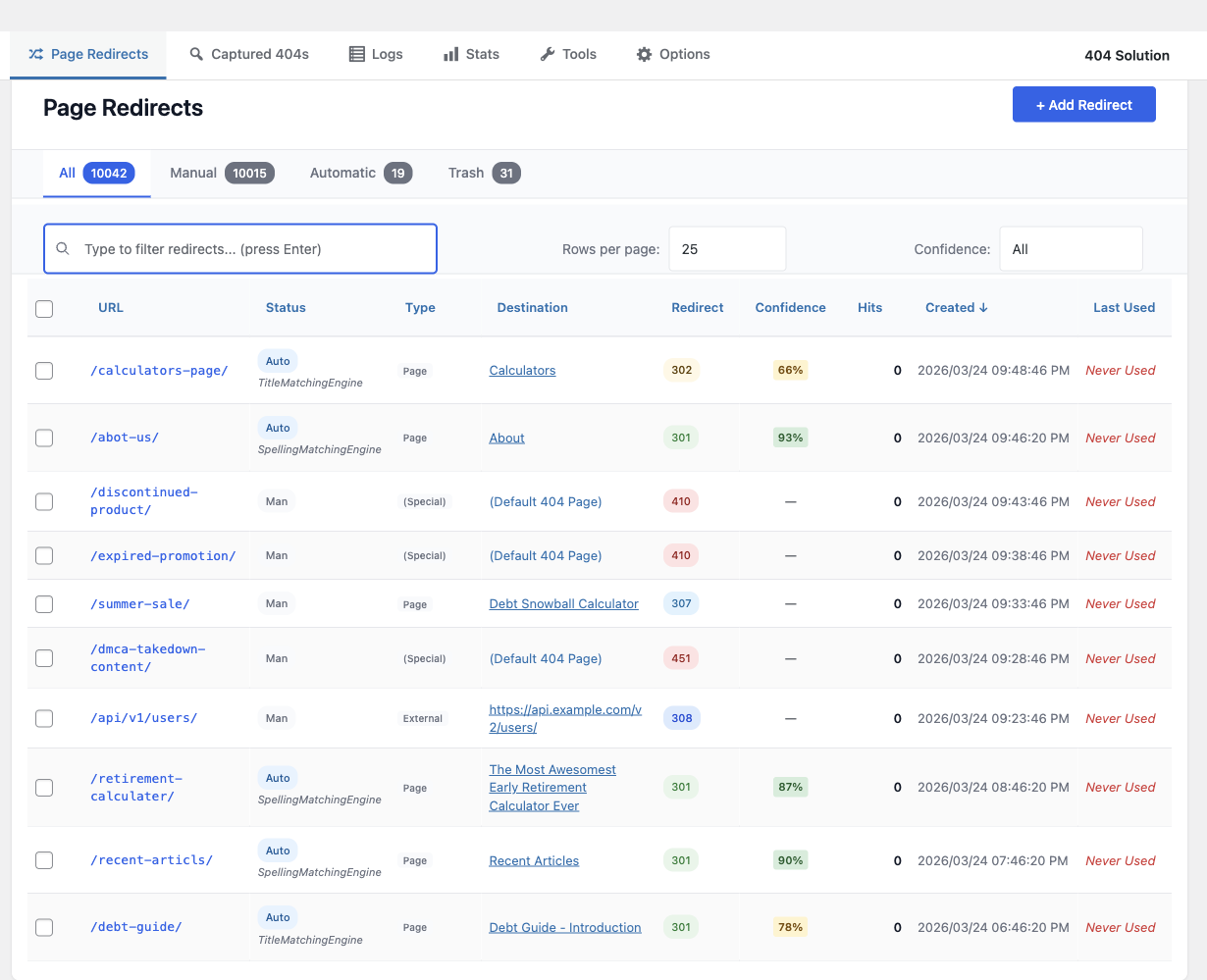
Stop losing visitors and search rankings to broken links. 404 Solution automatically redirects 404s to the right page — not just your homepage — using a 7-engine matching pipeline that includes a spell-checking algorithm to find what visitors actually typed.
Example: A visitor hits /prodcut/awesome-item (typo). Most 404 redirect plugins send them to your homepage. 404 Solution’s spell-checker finds /product/awesome-item and redirects them there automatically.
Why 404 Solution Is Different
Most redirect plugins fall into two categories: tools that require you to manually write every rule, or tools that blindly send every 404 to your homepage. 404 Solution does neither.
- A spell-checking algorithm that actually matches typos. Using Levenshtein distance and N-gram scoring, 404 Solution catches
/prodcut/,/categroy/, and/wooocmmerce/and finds the real destination — something no other free plugin does. - 7 matching engines, in sequence. Slug match URL fix Title keywords Category/tag paths Content search Spelling similarity Archive fallback. The first engine with a confident match wins.
- Automatic, from day one. Install and activate. 404 Solution starts capturing and redirecting immediately. You can tune it; you don’t have to.
- Redirect management when you need it. Full manual redirect editor, regex support, bulk actions, and CSV/JSON import compatible with Redirection’s export format.
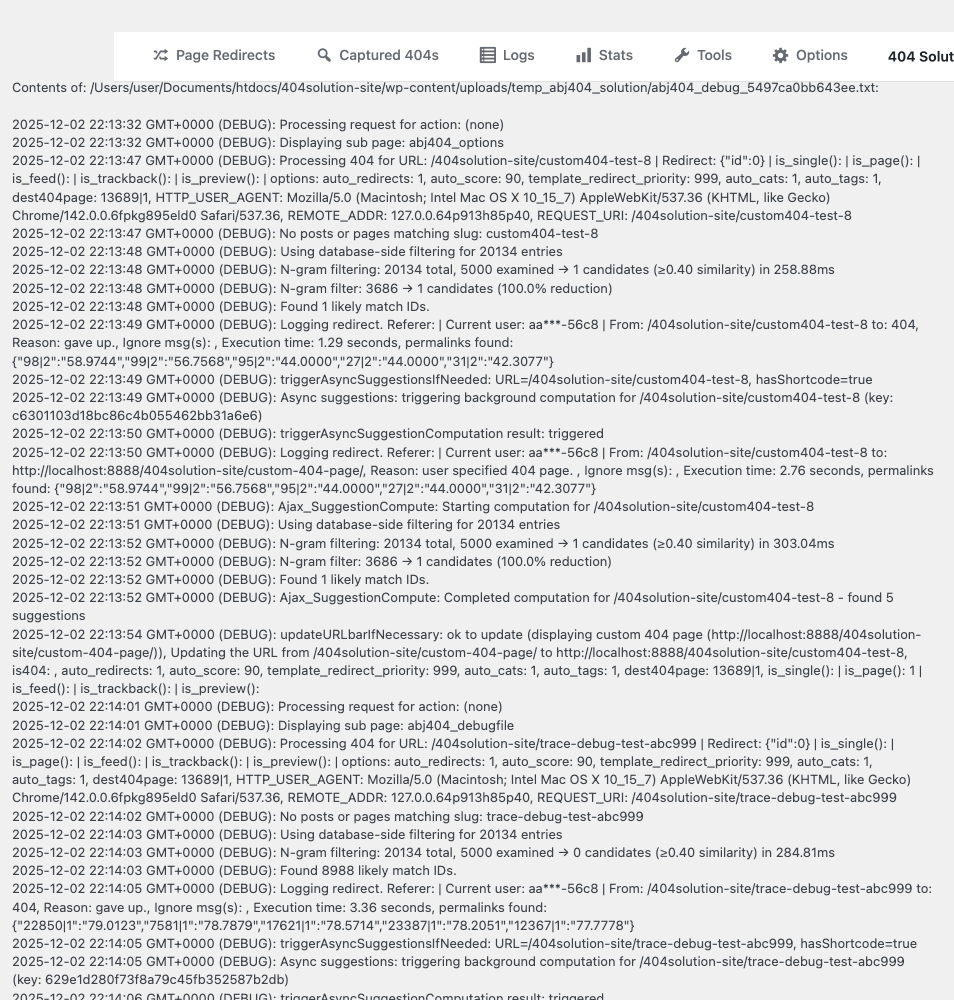
- Debug mode that shows its work. Enable debug logging and see exactly which engine chose a redirect and why — a level of transparency no competing plugin offers.
- Built for real-world hosting. Self-healing database tables, auto-recovery from corruption, automatic log trimming, and zero wp-admin-wide banners.
- Ships with extras most plugins sell separately. HTTP 410 Gone, 307/308/451 status codes, Google Search Console integration, REST API, WP-CLI support, email digest reports, and security probe detection — all free.
Unlike plugins that blindly redirect to your homepage
A 404-to-homepage redirect tells Google your broken URL is the same page as your homepage. That creates a soft 404 — a page Google may index as duplicate content, eroding crawl budget and ranking over time.
404 Solution redirects to the correct destination, or returns a proper 410 Gone when content is permanently removed. Both outcomes are better for search engines and for visitors.
How It Works
- A visitor reaches a URL that returns a 404.
- 404 Solution runs the URL through its 7-engine pipeline.
- Each engine tries to find a confident match above its score threshold.
- The first engine to find a match wins. The visitor is redirected to the correct page.
- The redirect is logged. You can review, edit, or delete it from the dashboard.
The whole process adds no perceptible latency for visitors on non-404 pages. The matching pipeline only runs when a genuine 404 occurs.
Key Features
Intelligent Automatic Matching
- 7-engine matching pipeline (slug, URL fix, title, category/tag, content, spelling, archive)
- Levenshtein distance + N-gram scoring catches genuine typos
- Per-engine confidence thresholds — tune aggressiveness per engine
- Conditional engine groups — override the matching strategy for specific URL patterns
- Slug-change auto-detection — redirects created automatically when you rename a post
- Trash/deletion monitoring — redirect created automatically when a post is deleted
Redirect Management
- Manual redirect editor with bulk actions
- Full regular expression support
- CSV and JSON import/export (compatible with Redirection plugin format)
- .htaccess and Nginx server-level export
- Per-post and per-term exclusion via meta box
- HTTP status codes: 301, 302, 307 (method-preserving temporary), 308 (method-preserving permanent), 410 Gone, 451 Unavailable For Legal Reasons, and Meta Refresh
- GDPR-compliant: IP addresses are hashed before storage — never written to disk in plain text
404 Monitoring and Logging
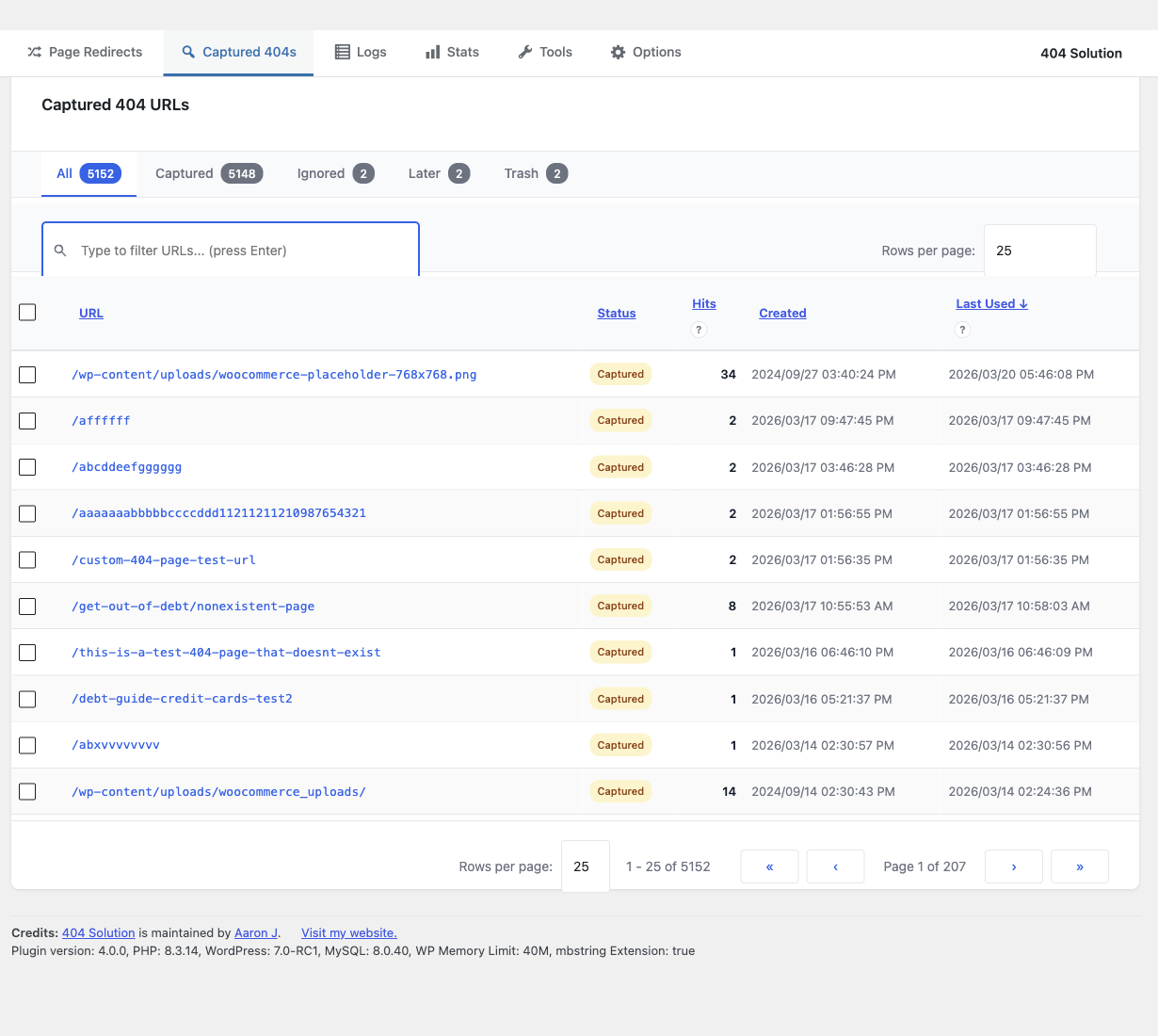
- Captures every 404 hit with referrer, user agent, and timestamp
- Automatic log trimming with configurable disk usage limits
- Security monitoring — flags vulnerability scanner probes (.env, /wp-config.php, phpMyAdmin, etc.)
Reporting and Diagnostics
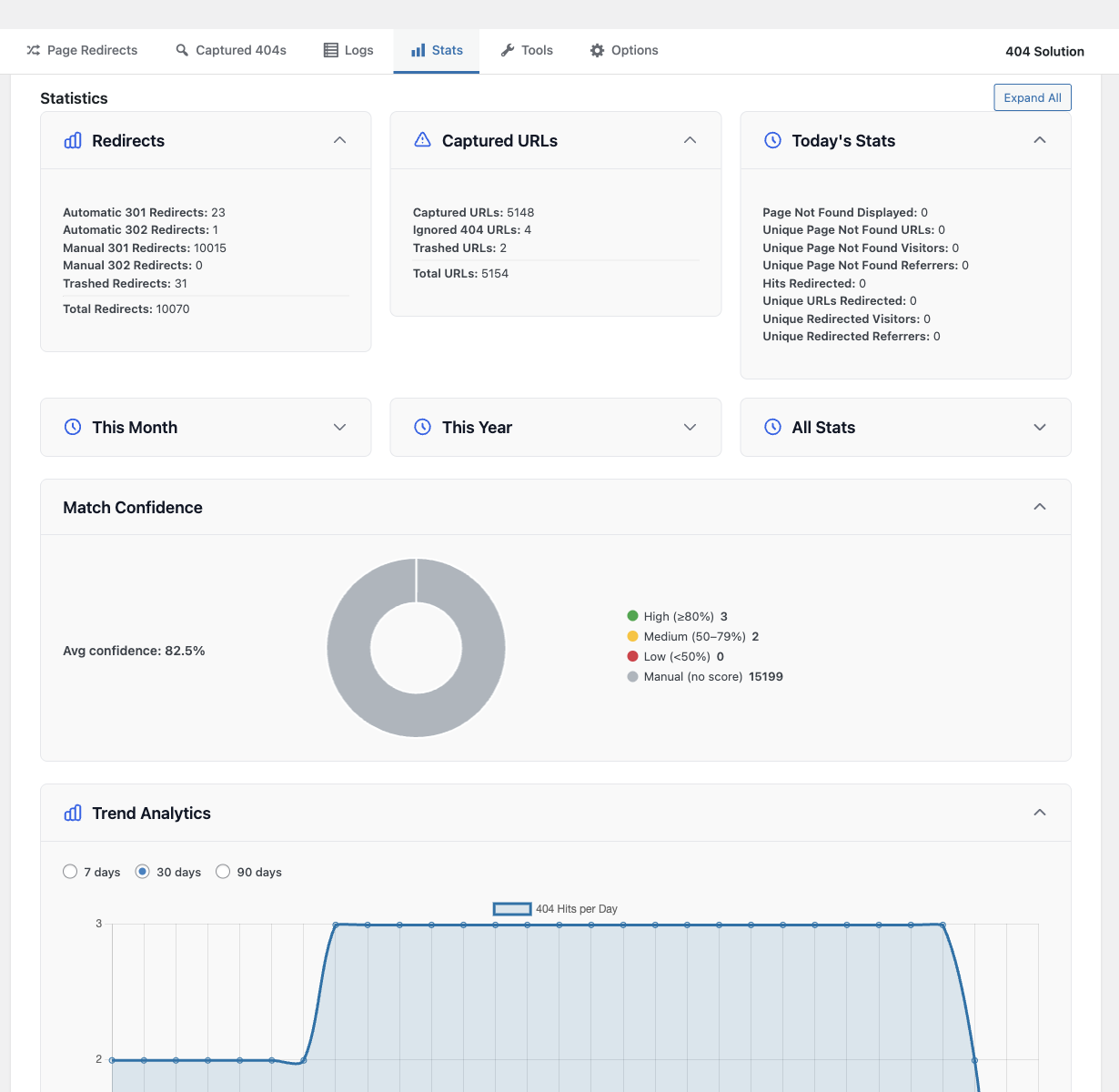
- Stats dashboard with traffic trend charts (404s, redirects, captures over time)
- Email digest reports
- Debug logging — see which engine fired and why
- Google Search Console integration — import crawl errors and push fixes
- Internal link scanner to find broken links before visitors do
Developer and Integrator Tools
- REST API for redirect management
- WP-CLI subcommands (list, create, delete, import, export)
- Scheduled maintenance cron
- Full WordPress Multisite support
Compatibility
- WooCommerce (products, variations, categories, custom URLs)
- Yoast SEO, Rank Math
- WPML, Polylang, TranslatePress
- Easy Digital Downloads
- All custom post types and custom taxonomies
Perfect For
- eCommerce sites (WooCommerce, EDD) with changing product URLs
- Content sites with evolving permalink structures
- Migrated sites where old URLs need to map to new content
- Large sites with thousands of pages where manual redirects are impractical
Skermôfbyldings
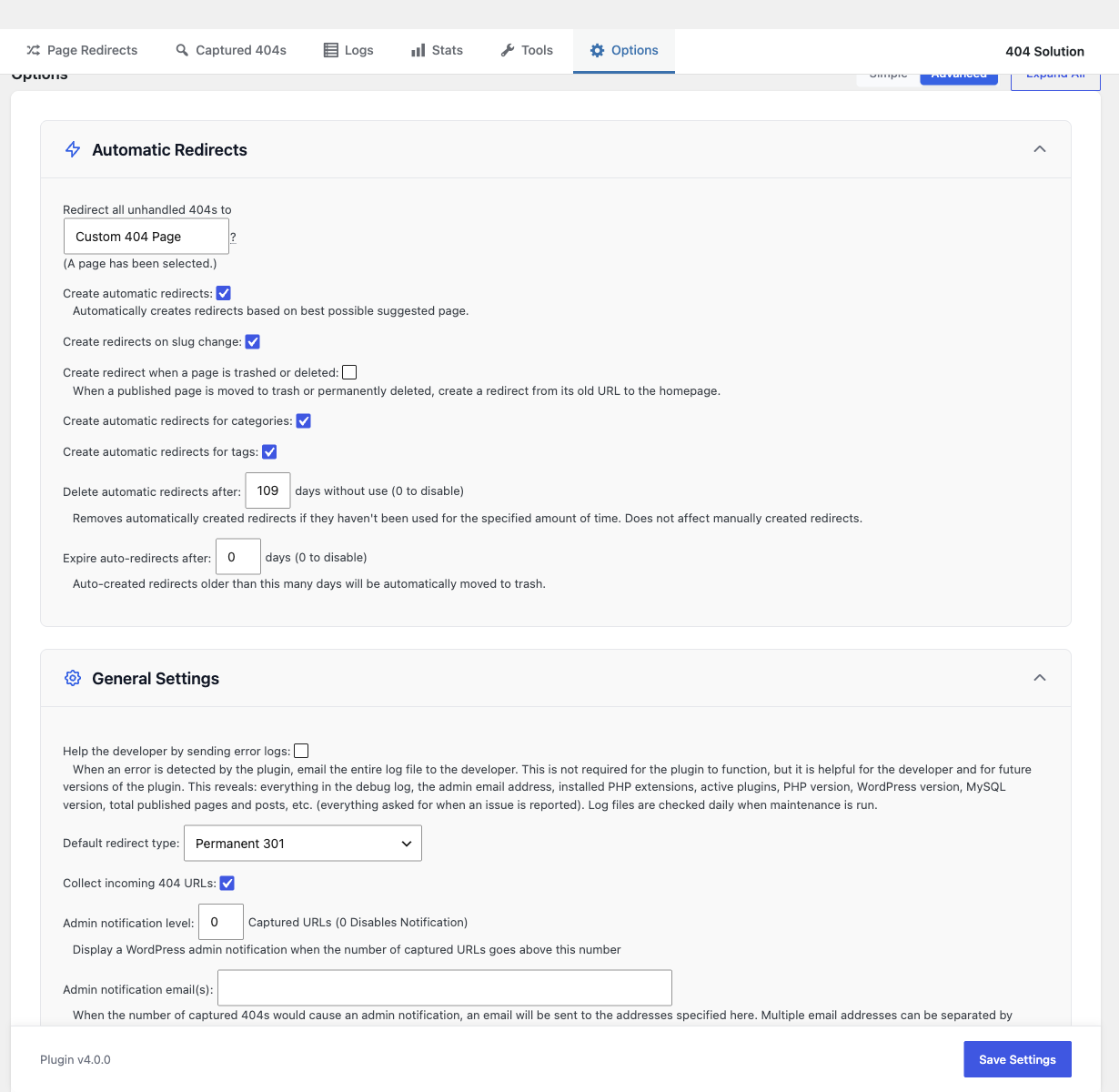
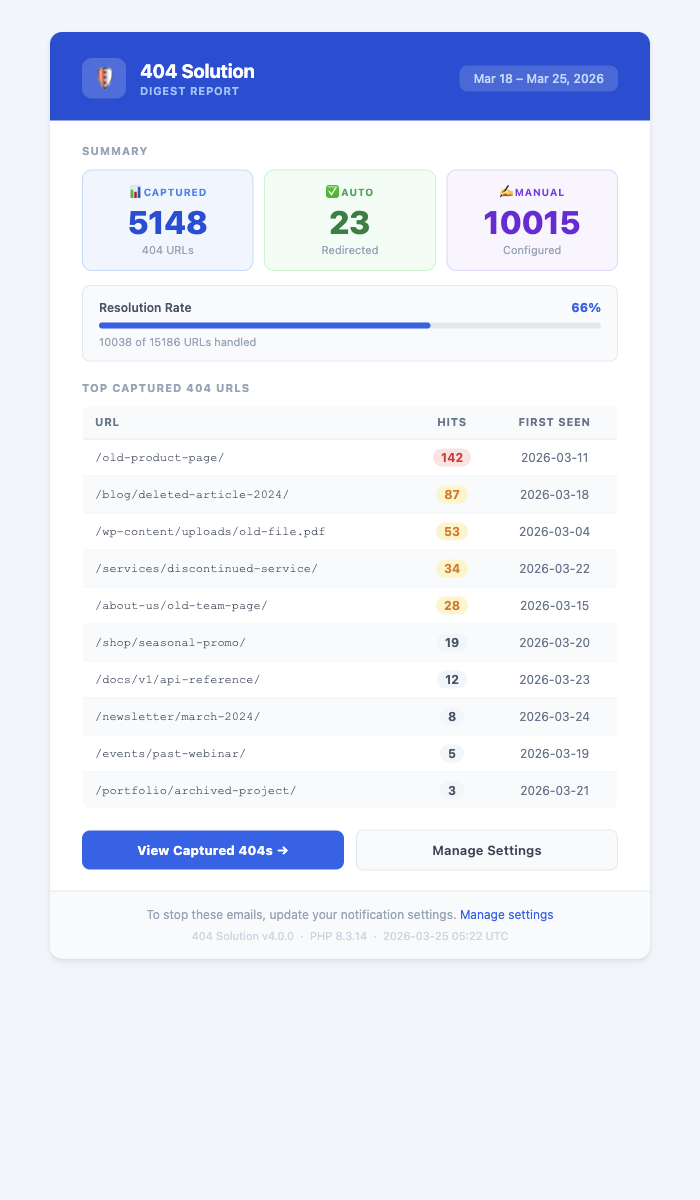
Ynstallaasje
- Unzip the files and upload the contents to
/wp-content/plugins/. - Activate the plugin.
- Use the
Settings -> 404 Solutionoptions page to set the options.
FAQ
-
How is this different from the Redirection plugin?
-
Redirection is a manual redirect manager — you write the rules, it applies them. That is useful when you know in advance which URLs will break. 404 Solution handles the URLs you don’t know about: it automatically finds the right destination using a 7-engine matching pipeline and a spell-checking algorithm.
Example: If a visitor types
/prodcut/awesome-item, Redirection does nothing unless you manually created that specific rule. 404 Solution finds/product/awesome-itemautomatically.The two plugins are complementary. Many sites run both: Redirection for planned migrations and 404 Solution for everything else.
-
How is this different from 404 to 301?
-
404 to 301 redirects ALL 404 errors to one fixed destination (usually the homepage). 404 Solution finds the actual page the visitor was looking for. Sending visitors to your homepage is poor UX and can create soft 404 problems in Google Search Console.
-
How is this different from WP 404 Auto Redirect to Similar Post?
-
WP 404 Auto Redirect uses keyword matching, which works when the URL contains recognizable words from a post title. It fails on character-level typos — a URL like
/prodcut/has no keyword that matches “product.”404 Solution adds Levenshtein spell-checking, which catches transpositions and typos regardless of whether the keywords match. It also includes: full 404 logging, manual redirect management, CSV import/export, 410/451 status codes, GDPR IP hashing, debug logging, REST API, and WP-CLI support.
-
What HTTP status codes are supported?
-
301 (permanent redirect), 302 (temporary redirect), 307 (temporary, method-preserving), 308 (permanent, method-preserving), 410 Gone (correct response for permanently deleted content — better for SEO than a 301 to homepage), 451 Unavailable For Legal Reasons, and Meta Refresh (client-side HTML redirect).
Using 410 instead of redirecting deleted content to your homepage produces better results in Google Search Console and prevents soft-404 indexing.
-
Will this slow down my site?
-
No. The matching pipeline only runs when a genuine 404 occurs — normal page loads are unaffected. For large sites, 404 Solution uses N-gram indexing and caching tables to keep matching fast. Once a redirect is established, subsequent hits are served from the redirect table directly, bypassing the pipeline.
-
Does it work with WooCommerce?
-
Yes. 404 Solution indexes WooCommerce products, product variations, product categories, and tags. When a product URL changes or a product is deleted, the appropriate redirect is created automatically.
-
What happens when a redirect destination is deleted?
-
404 Solution detects when a destination post is trashed or deleted and flags the redirect. Redirects pointing to deleted content are highlighted in the redirect table so nothing slips through unnoticed. The daily maintenance cron automatically removes orphaned auto-redirects.
-
Can I import redirects from another plugin?
-
Yes. 404 Solution imports CSV and JSON in the Redirection plugin’s export format. It can also directly import from Rank Math, Yoast SEO, AIOSEO, and Safe Redirect Manager’s database tables from the Tools tab.
-
Is it GDPR compliant?
-
Yes. IP addresses are hashed using a one-way algorithm before storage; the original IP is never written to disk. Log retention limits are configurable. By default no data is transmitted to external servers. The “Help the developer by sending error logs” admin checkbox (default off) and the uninstall feedback modal are the only opt-in paths that send data to the plugin author’s reports server. See the plugin’s privacy policy stub at
docs/privacy.mdfor the retention period for rows keyed by site_url, the data-subject erasure path, and the processing region for the reports endpoint. -
Does it support regex?
-
Yes. Manual redirect rules support full regular expression syntax for source URLs.
-
Does it work with WPML, Polylang, or TranslatePress?
-
Yes. 404 Solution detects the active language from the multilingual plugin’s API and resolves redirect destinations to the correct translated version automatically.
-
Can I use WP-CLI to manage redirects?
-
Yes. 404 Solution includes WP-CLI subcommands for listing, creating, deleting, importing, and exporting redirects — useful for scripted migrations and DevOps workflows.
-
Does it work after a site migration?
-
Yes. 404 Solution is ideal for site migrations: slug-change auto-detection, URL typo correction (strips
.html,.php,.asp), hierarchical category path resolution, and regex redirects for bulk pattern changes. -
Can I redirect all 404s to a specific page?
-
Yes. Go to Settings 404 Solution Redirect all unhandled 404s to and select your preferred fallback page.
-
How do I manage log files and disk usage?
-
Log cleanup is automatic. Configure maximum log size under Options General Settings Maximum log disk usage. You can also manually clear logs from the Logs page.
-
Can I exclude certain URLs from being processed?
-
Yes. Use Options Advanced Settings Files and Folders Ignore Strings to add paths to ignore. Per-post and per-term exclusion is also available via the edit screen checkbox.
-
How do I exclude a specific post or page?
-
Edit the post/page and check the “Exclude from 404 Solution redirects” checkbox in the sidebar. Category and tag terms can also be excluded via term meta on the edit screen.
-
Have you written any other programs?
-
Check out AJ Experience for other useful tools and resources.
Resinsjes


Meiwurkers & amp; Untwikkelders
“404 Solution” is iepen boarne software. De folgjende minsken hawwe bydroegen oan dizze plugin.
Meiwurkers
“404 Solution” is oerset yn 4 lokaasjes. Tank oan de oersetters foar harren bydragen.
Oersette “404 Solution” yn jo taal.
Ynteressearre yn ûntwikkeling?
Blêdzje troch de koade , besjoch de SVN-repository , of abonnearje op it ûntwikkelingslogboek troch RSS .
Feroaringslog
Version 4.3.1 (June 26, 2026)
- FIX: Fixed an out-of-memory error (thanks to johnegg and kalshyre for reporting this).
- FIX: Fixed other things that looked like possible out-of-memory errors during maintenance.
- Improvement: Made automatic error reporting more robust to cover OOM as best as possible as well as other failure types.
Version 4.3.0 (June 12, 2026)
Bug Fixes
- Fixed locale-stale labels in the Page Redirects view cache by storing status and type as integer codes only, translating labels at render time, and dropping the legacy translated-label columns during upgrade.
- Fixed the Page Redirects and Captured 404s admin tabs still occasionally failing to load on high-traffic sites running 4.2.0. The 4.2.0 release notes claimed this was fixed, but only the cache-warmup race was addressed. A separate internal “mutation watermark” gate could still abort the cache rebuild mid-stage when 404 traffic arrived during the rebuild, and surface the same “Could not finish refreshing data” message at the 45-second budget. That gate and its supporting machinery (watermark counter table, admin-mutation gate, view-build watermark stamping) have now been removed in full. On Bruno-class data (about 30,000 active redirects, about 384,000 hit rows, sustained 1 request per second or higher 404 traffic), the admin tabs hydrate within budget across consecutive refreshes.
- Fixed a stale “No ID(s) found” notice appearing after a redirect was edited and saved successfully. The notice from the prior screen is now cleared so the success message stands alone.
- Fixed a stuck “Refreshing data… (stage 4)” badge that could remain on the Page Redirects pagination strip after a background refresh failed. The strip now collapses placeholder-only rows on a failed table load, and the error notice no longer competes with the 5-star review prompt for attention.
- Fixed generic “Something went wrong” messages on admin AJAX errors. The underlying cause is now appended in parentheses so the error is self-diagnosable, and the multi-stage diagnostic detail is tucked behind a collapsed Details panel.
- Fixed
wp abj404 listnot returning redirects that were just created viawp abj404 createin the same session, and corrected the--status=manualfilter so manually-created redirects are returned. - Fixed CSV-imported redirects not appearing in the Page Redirects table immediately after import. The cached view is now rebuilt synchronously when the import completes, so the table reflects the new rows on the next page load.
- Fixed a “table doesn’t exist” error path that could fire during a partial install or upgrade. The data layer now tolerates an unprepared
$wpdband surfaces a clean degraded state instead of a fatal. - Fixed the plugin’s settings defaults not being available on the uninstall path, which could leave a stray option behind on some sites.
- Fixed a duplicate-accessible-name accessibility warning on the redirects list. The “Add Redirect” submit button inside the modal is now labeled “Add”, which removes the collision with the page-level “Add Redirect” action button.
- Fixed a fatal that could occur on the Plugins admin screen when
wp-admin/includes/plugin-install.phpwas unavailable on hardened hosts (the include is now guarded withis_readable). - Fixed a fail-open default in the REST captured-404s status filter that could return rows from an unintended status when an unknown filter value was supplied.
- Fixed the URL and Destination column-sort “being prepared” progress indicator that could stay stuck at 0% on large sites where a security plugin blocks the WordPress cron loopback. The one-time sort-key preparation is now driven by the admin’s own page view in the background, with a longer and gentler retry window, so column sorting becomes available without depending on WP-cron, and a transient timeout no longer halts the progress.
Improvements
- Several admin surfaces were restyled to match native WordPress chrome and feel quieter on the eye: the top sub-navigation now uses standard
.nav-tabstyling; the Edit Redirect form follows the nativeform-tableshape; list-table filter rows use subsubsub pipe-separated links; status badges and pills use the bordered-label shape; checkbox columns and column-header padding match core WP list tables; AJAX error notices use the native.notice-errorshape; and the self-healing dashboard notice routes through the standard notice template. - Several internal queries that scanned the full
information_schema, post-type table, or content-keywords index on large sites are now bounded, removing a needless cost during background cache rebuilds. No behavior change for typical sites; smoother performance on sites with thousands of post types or very large content tables. - Changed the internal admin-notice payload schema to store translated message and guidance text directly, removing the message catalog indirection. No user-facing behavior change is expected.
- When a background refresh fails, a Support button is now mounted directly on the failure notice so the report path is one click instead of a hunt through Settings.
Version 4.2.0 (May 23, 2026)
Bug Fixes
- Fixed the “Page Redirects” and “Captured 404s” admin tabs occasionally failing to load on busy sites. The cache-warmup pipeline could race against ongoing 404 traffic and report that the data snapshot was missing even when the underlying query had succeeded. Admin tables on high-volume sites now load reliably.
Improvements
- Substantial internal refactor of the data-access, view-build, and admin-mutation layers for long-term maintainability. No visible behavior change is expected; the version bump from 4.1.x to 4.2.0 reflects the size of the change.
Version 4.1.19 (May 17, 2026)
New Features
- Regex redirects are now auto-detected. When you save or import a redirect that contains regex characters (wildcards, brackets, pipes), the plugin automatically marks it as a regex redirect and applies the correct syntax. No need to manually check the “Treat as regex” box. An admin notice confirms the auto-promotion with Edit and Undo links.
- Debug logs now automatically redact sensitive server details (database name, table prefix, filesystem paths) so logs can be shared safely without manual editing.
Bug Fixes
- Fixed the Confidence dropdown filter on admin tables only working on the initial page load. Changing the filter and then navigating pages or waiting for the background refresh would reset it to “All”, showing every row.
- Fixed invalid regex patterns in CSV imports crashing the import. Invalid patterns are now validated during import and suppressed at runtime instead of causing errors.
- Fixed the repair-and-retry path continuing to report an error after the repair succeeded. The error is now cleared immediately after a successful repair.
- Fixed a potential SQL ambiguity error in log queries on sites with certain JOIN configurations.
- Fixed all 6 scheduled tasks not being removed when the plugin is deactivated. Previously some cron hooks were left behind and would trigger errors until manually cleared.
- Fixed the “Undo” link on regex auto-promotion notices not reverting the URL on the next page load. The original URL is now correctly restored along with the Manual status.
- Fixed a rare race on shared hosting where a dropped database connection during the admin table rebuild could let a second worker drop the rebuild’s working table out from under the first, producing “Table doesn’t exist” or “Can’t find .frm file” errors. The rebuild now releases its database lock between each step so a dropped connection loses at most one step of progress instead of the entire 11-step run.
Improvements
- Bulk CSV and WP-CLI imports are significantly faster. A 10,000-row import that previously issued ~60,000 extra cache-invalidation queries now batches them into a single invalidation at the end.
- The admin settings page now validates URL length and rejects negative numeric values, preventing misconfigured redirects.
Internationalization
- Added translations for 6 new strings in all 12 language files.
Version 4.1.18 (May 13, 2026)
Bug Fixes
- Fixed the admin table cache rebuild getting stuck on the same step after a dropped database connection. The rebuild now auto-resumes from where it stopped on the next request, instead of retrying the same failing query forever.
- Fixed admin actions that hit an expired session nonce showing a generic “security check failed” error. The session is now silently refreshed and the action retried, so the expiry is invisible to the administrator.
- Fixed transient invalid AJAX responses on admin tables producing “undefined” errors. The admin pages now validate the response shape before reading it and surface a clear error instead.
- Fixed the “missing database table” admin notice being cleared by the next successful query in the same request, so the admin never saw it. The generic auto-clear now skips the missing-table notice; that notice is cleared only by the dedicated repair-success path.
Improvements
- Captured 404s and Page Redirects admin tables load noticeably faster on large sites. The total log-count query is now cached on the maximum log id (avoiding a full log-table scan on every page load), log queries no longer sort by non-indexed columns, the Most Unused Redirects report reads from the pre-aggregated hits rollup instead of scanning raw logs, and the dashboard activity trend is cached between admin page loads.
- When WordPress cron is broken and the log hits rollup falls behind, the plugin now surfaces an admin notice on its own pages explaining how to fix it, instead of silently letting the admin tables show stale numbers.
Internationalization
- Added translations for 13 admin strings that were previously displayed in English even on non-English sites.
Version 4.1.17 (May 10, 2026)
Bug Fixes
- Fixed repeated “Access denied” errors and silently-stuck Captured 404s and Page Redirects pages on shared and managed hosting environments where certain database privileges are restricted. The rebuild now skips the affected step and continues, instead of retrying the same denied operation on every cron run and emailing the site administrator.
- Fixed the rebuild silently never starting on managed or sharded MySQL services (such as PlanetScale and Vitess) that do not support standard MySQL named locks. The plugin now uses an alternate locking mechanism on these hosts.
- Fixed the rebuild getting permanently stuck after a previous run was interrupted (for example, by a server restart mid-rebuild). The plugin now detects and cleans up leftover state at the start of the next rebuild so it can complete normally.
- Fixed the rebuild silently waiting forever when WordPress scheduled tasks (cron) are disabled and no external cron is configured. The plugin now shows a clear admin notice with guidance on how to resolve it.
- Improved compatibility with multisite networks during long-running rebuilds that span multiple background tasks.
- Improved compatibility with persistent object caches (Redis, Memcached) so that rebuild progress is reliably saved even when the cache layer is briefly inconsistent.
- Improved compatibility with HyperDB, LudicrousDB, and other custom database drop-ins.
Improvements
- The plugin now self-detects unusual PHP and database hosting limits (memory limit, time limit, strict SQL modes, query packet size) at the start of each rebuild and adapts to work within them, instead of failing on restrictive hosts.
Version 4.1.16 (May 8, 2026)
Bug Fixes
- Fixed the Captured 404s and Page Redirects admin pages getting stuck on “Creating build buffer (1/11)” forever on hosts with the standard 30-second PHP execution limit (the default on most shared hosting). The cache rebuild was yielding before inserting any rows because it was reserving more PHP time than the request actually had, so each rebuild request returned without making progress. The first batch of every rebuild step now always runs, so the rebuild reliably moves forward on a typical 30-second host.
- Fixed Captured 404s and Page Redirects admin pages still failing to load when the database killed a single rebuild step (max statement time exceeded, lost connection, lock timeout): the entire rebuild used to give up, but it now resumes on the next request from where it left off, at every step.
- Fixed brief network blips and intermittent 5xx responses during a long rebuild causing the admin page to show “Could not finish refreshing data” instead of continuing to wait. Transient errors are now treated as a no-progress tick and the page keeps polling.
- Fixed the rebuild getting stuck retrying the same single-statement step (index build, hit-count update, or sort-index step) when the host’s database statement timeout was shorter than that step needed to complete. Those steps used to retry with the same too-tight timeout forever; now the per-query timeout is extended for the retry so the step can finish.
Improvements
- The admin-table rebuild now adapts its batch size to the host. If a batch is killed by the database, the next attempt uses a smaller batch, and the smaller size is remembered for the rest of the rebuild so slow shared hosts converge on a size they can actually finish.
- Per-query timeouts during the rebuild are now sized to the host’s own statement timeout (MariaDB max_statement_time / MySQL max_execution_time), so a kill produces a clean classifiable error the rebuild can resume from rather than a dropped connection.
Version 4.1.15 (May 6, 2026)
Bug Fixes
- Fixed a plugin load fatal on PHP 7.4 to 8.1 hosts that was introduced in 4.1.14. A constant inside a trait (added with the staged view rebuild) is only valid in PHP 8.2 and later; the declared minimum is PHP 7.4, so this restores compatibility for all supported PHP versions.
Version 4.1.14 (May 6, 2026)
Bug Fixes
- Fixed Captured 404s and Page Redirects admin tables getting stuck or returning “Could not load table data” on very large sites while the table cache was being rebuilt. The rebuild now resumes in small background steps and the admin screen keeps polling progress until the data is ready.
- Fixed a race where an admin table could retry too soon after a background rebuild started, causing repeated loading failures instead of waiting for the rebuilt data.
Improvements
- The Captured 404s and Page Redirects admin tables now use a staged cache rebuild that splits expensive destination, status, and hit-count work into bounded batches. Large sites should see more reliable table loading without long-running AJAX requests.
- Added clearer in-page progress handling while the admin table cache is warming, so administrators can tell the plugin is still working instead of seeing a static loading state.
Version 4.1.13 (May 2, 2026)
Bug Fixes
- Fixed “Could not load table data” timeouts on the Captured 404s and Page Redirects admin tables. On sites with a large WordPress posts table, the count query now skips unrelated JOINs when no search filter is active, and admin table caches are warmed in the background across multiple short requests instead of one long one — so the tables reliably load even when individual queries are slow.
Improvements
- The plugin admin footer now includes a collapsible Debug Info section showing per-stage AJAX timings, errors, and database query timings for the Captured 404s and Page Redirects views. When reporting a slow or stuck admin table, you can copy this directly without opening browser developer tools.
- SQL errors are now recorded before any automatic recovery (table repair, retry with a relaxed collation) runs, so the original cause of a failing query stays visible in the support log instead of being overwritten by the recovery attempt’s own messages.
Version 4.1.12 (May 1, 2026)
Bug Fixes
- Fixed Captured 404s and Page Redirects table AJAX requests timing out while background log-cache maintenance was running. Maintenance that is triggered by an AJAX table load now runs through scheduled background tasks instead of shutdown work tied to the same HTTP request.
- Fixed debug-log setup failing on sites with negative or fractional WordPress timezone offsets.
- Fixed diagnostic logging paths that could throw while trying to report another error, which could hide the original problem behind a secondary logging failure.
Version 4.1.11 (May 1, 2026)
Bug Fixes
- Fixed loss of captured-404 history when the database performed automatic repair of a crashed log table. The plugin previously dropped and recreated the affected table after repeated repair failures, destroying logged hits in the process. It now leaves the table alone if repair cannot succeed, preserving your captured-404 history.
- Fixed loss of log data during repair of damaged plugin tables that were missing their primary key column. This was the underlying cause of the log-history loss reported during the 4.1.6 to 4.1.7 upgrade. The repair now preserves all existing rows instead of recreating the table from scratch.
- Fixed timeouts during the nightly log-cache rebuild on sites with aggressive log retention. The rebuild now reliably completes within shared-host time limits.
Improvements
- The Captured 404s list and other admin views that read log data now load substantially faster on sites with large log tables. A new indexed column replaces a slower per-row computation; existing sites are updated in the background during nightly maintenance and speed up over time.
Version 4.1.10 (Apr 30, 2026)
Bug Fixes
- Fixed disk-full, read-only, and crashed-table conditions encountered during log flush and N-gram cron scheduling escalating to error level and triggering developer email reports. These hosting conditions are now classified as warnings — the plugin already degrades past them — so they no longer spam the admin’s inbox.
- Fixed admin AJAX error notices showing only generic HTTP/textStatus information when a paginated admin view timed out or returned a 500. The notice now includes the elapsed request time, the server-side processing stage that was in flight when the failure occurred, and the redacted SQL of the failing query when available, so the cause is identifiable without a server log dump.
- Fixed a parse-time fatal on PHP 7.4 through 8.1 caused by two trait-level constants introduced with the canonical-URL backfill work. The constants are now declared on the using class so the trait file parses cleanly on every supported PHP version.
Improvements
- The Page Redirects and Captured 404s admin views are now significantly faster on installs with very large redirects tables. Each redirect now stores a precomputed canonical URL that is indexed and JOINed against the hits rollup, eliminating the per-row CONCAT/TRIM evaluation that could time out the admin AJAX request on sites with hundreds of thousands of captured rows. The column is backfilled in chunks during the upgrade and the nightly maintenance cron, so large sites converge across cron ticks without blocking any single request.
- The daily cron that flags dead-destination redirects now scales with URL count rather than raw log-row count. The query now JOINs against the precomputed
logs_hitsrollup with a newfailed_hitscolumn, completing in milliseconds even on sites with millions of log rows where it previously timed out. - The admin AJAX timeout for explicit user actions (sorting, filtering, pagination) was raised from 15 seconds to 45 seconds. Background detect-only refreshes still use the tight 15-second budget, so the longer timeout only applies when the admin is actively waiting.
- Several catch blocks across the plugin that previously swallowed exceptions silently now emit a warning breadcrumb to the support log, so unexpected failure paths are visible in support bundles instead of vanishing.
Version 4.1.9 (Apr 29, 2026)
Bug Fixes
- Fixed potential over-deletion of log history during the daily cron cleanup. The destructive DELETE was sized using an approximate row count from MySQL metadata, which can drift by orders of magnitude on InnoDB. The cron now gates the delete on an exact byte-size check before deciding what to remove.
- Fixed captured-URL counts undercounting when the same URL was logged with and without leading or trailing slashes (e.g.
/foo,foo,/foo/). URL variants now collapse to a single canonical row in the hits rollup, restoring slash-tolerant matching that regressed in 4.1.7. - Fixed Email Digest dropping captured URLs that had zero recent hits. The “Top Captured 404s” section now lists captured rows with no hits as well as those with hits, matching the on-screen behavior.
- Fixed Email Digest rendering a misleading “No captured 404s in this period” notice while the hits rollup was being rebuilt. The digest now ships with an explicit “Top URLs unavailable: log rollup is being rebuilt” message instead.
- Fixed the high-impact captured-count cache holding a value of zero for 24 hours when the rollup was unavailable or the query errored. The result is now cached only on a successful query, so the count recovers on the next page load.
- Fixed the Stats trend chart cache being polluted with empty results when the trend query errored or timed out.
- Fixed admin search inputs on Page Redirects and Captured 404s rendering a stray “O”-shaped SVG glyph above the search box.
- Fixed the health bar “unavailable” indicator rendering as a transparent dot during rollup rebuild — it now displays as a muted gray dot to communicate the transient state.
- Fixed every frontend 404 falling through to the theme 404 page on installs where the database upgrade could not complete (corrupted DDL files, opcache divergence, restrictive shared hosting). The redirect lookup now falls back to a schema-tolerant query against the existing redirects table, so manual redirects keep firing while the upgrade is stuck. Trade-off: scheduled redirects briefly stop honoring their start/end windows during the degraded window.
- Fixed asynchronous page suggestions failing to surface for long or low-overlap 404 URLs. The async worker now prioritizes recall over worst-case latency, since it already runs out-of-band and is rate-limited.
- Fixed admin tables remaining stuck on “Loading…” indefinitely when the AJAX request to fetch table data hangs (for example, while the plugin is recreating a missing database table on the slow path). The AJAX call now has a 15-second client-side timeout, the retry/fallback path replaces the loading rows with a clear error message instead of just stripping the placeholder attribute, and AJAX errors render a non-blocking admin notice instead of a native browser
alert()dialog.
Improvements
- The Captured 404s and Page Redirects admin tables now render quickly even on sites with millions of log rows. The high-impact captured count, the per-row hit population query, the Email Digest top-captured query, and the Stats trend chart now all read from the pre-aggregated
logs_hitsrollup table, eliminating multi-second full-log scans that could time out behind Cloudflare and other reverse proxies. - Health bar AJAX is now decoupled from pagination — the redirects table renders immediately while the health bar hydrates in a separate request, so a slow rollup query no longer blocks first paint.
- The daily cron now reads log row counts from MySQL
information_schemametadata instead of running a full index scan on every nightly tick. - Permalink keyword cron updates are now issued as a single bulk SQL query instead of up to 500 single-row UPDATEs per cycle, sharply reducing database load on busy sites.
- The anonymous suggestion-compute endpoint now enforces a per-IP rate limit and rejects unauthorized requests before any plugin classes are loaded.
Version 4.1.8 (Apr 28, 2026)
Bug Fixes
- Fixed a critical 4.1.7 regression where the
wp_abj404_logs_hitscache table was dropped during the 4.1.6 4.1.7 upgrade and never recreated. Affected sites saw “Table doesn’t exist” errors flooding the debug log and triggering email reports. Sites that already upgraded to 4.1.7 will have the table automatically recreated when they upgrade to 4.1.8 — the cache repopulates on the next scheduled rebuild. The destructive table-recreation step that caused this regression has been hardened to require positive evidence before dropping any table. - Fixed
mysqli_num_fields()TypeError on PHP 8.1+ MariaDB sites caused by the new query timeout wrapper (4.1.7) being passed towpdb::get_results()for non-SELECT queries. INSERT/UPDATE/DELETE/DDL queries now route throughwpdb::query()so the wrapper no longer confuses WordPress’s query classifier. - Fixed view-cache table self-repair only running on the upgrade path. Activation, scheduled cron runs, and upgrade now all repair a stripped view-cache table before any further table maintenance, so broken installs heal themselves regardless of how the plugin loads.
- Fixed spurious “Table doesn’t exist” debug-log noise and a stale
.notice-erroradmin banner during fresh installs. Pre-create maintenance queries are now silent when their target tables don’t yet exist.
Improvements
- Collation mismatches between database tables are now repaired automatically and silently. Previously these surfaced as admin notices; the plugin now runs collation correction on detection (rate-limited to once per hour), retries the original query, and only logs at debug level — no user action required.
Version 4.1.7 (Apr 25, 2026)
Bug Fixes
- Fixed HTTP 524 timeout error on the Captured 404s admin tab for sites behind Cloudflare or other reverse proxies. The hits table rebuild query (which joins the logs table with redirects) is now split into a fast chunked pre-aggregation that scales to millions of log rows.
- Fixed AJAX responses not being flushed before shutdown hooks, which could cause proxy timeouts even when the response data was ready.
- Fixed ANALYZE TABLE running on every Settings page load, causing unnecessary database overhead.
Improvements
- All database queries now have automatic execution time limits (not just SELECT queries). INSERT…SELECT, UPDATE, DELETE, and DDL queries are also protected on MariaDB; INSERT…SELECT is also protected on MySQL.
Version 4.1.6 (Apr 23, 2026)
New Features
- Automatic query timeout — all SELECT queries now include a server-side execution time limit, preventing runaway queries from locking the database on shared hosting.
- WordPress URL-guess fallback — when no matching engine finds a redirect, the plugin now tries WordPress’s built-in URL guessing as a last-resort redirect before returning a 404.
Improvements
- Admin pages now load instantly — all heavy database queries on the Redirects, Captured 404s, Logs, and Settings pages are deferred to AJAX, eliminating blocking page loads on large sites.
- Optimized three slow view queries that could cause timeouts on sites with large redirect and log tables.
Bug Fixes
- Fixed AJAX error state leaving placeholder loading attributes on admin tables, preventing interaction until page reload.
- Fixed duplicate bottom table separator appearing after AJAX table hydration.
- Fixed Logs page not loading via AJAX due to missing
.perpageclass on the per-page select element. - Fixed stray search filter and unwanted top pagination placeholders appearing on admin pages.
- Fixed SQL query referencing a non-existent column in the logs-hits join query.
Version 4.1.5 (Apr 22, 2026)
New Features
- Simple mode Phase 3 — streamlined UI with contextual guidance, suggested destinations for captured 404s, and auto-created redirects for first-time users. Hides advanced columns and options in Simple mode for a cleaner experience.
- Centralized Google OAuth — one-click Google Search Console connection via a Cloudflare Worker relay, replacing the manual client-ID setup.
Bug Fixes
- Fixed “Illegal mix of collations” errors when WordPress core tables use
utf8mb3and plugin tables useutf8mb4. Core columns are now wrapped withCONVERT(...USING utf8mb4)before applyingCOLLATE. - Fixed collation mismatch in
getPublishedImageIDsquery when comparing term names across tables with different collations. - Fixed
opcache_invalidate()emitting a PHP warning on hosts that restrict the function viadisable_functions(e.g. some WP Engine/Flywheel configurations). - Fixed potential out-of-memory crash when the
logs_hitsfallback query ran without a row limit — now capped at 5,000 rows. - Fixed four small correctness issues in redirect filtering, view queries, settings save, and redirect-table rendering.
Improvements
- Hardened admin page rendering against out-of-memory errors, corrupted options, and hook failures — the plugin now always shows its admin menu even when dependencies fail, and catches fatal errors with a shutdown handler fallback.
- Migrated four redirect query methods to the centralized
queryAndGetResults()handler for consistent error handling and retry logic.
Internationalization
- Added Simple mode Phase 3 strings to all 17 locale PO files.
- Added missing admin error message translations across all locale PO files.
Version 4.1.4 (Apr 20, 2026)
Bug Fixes
- Fixed “Illegal mix of collations” errors on spell-checker and permalink-cache queries when plugin tables and WordPress core tables use different collations (e.g.
utf8mb4_unicode_520_civsutf8mb4_unicode_ci). Extended theCOLLATEprotection pattern toupdatePermalinkCache.sql,getPublishedPagesAndPostsIDs.sql, andgetIDsNeededForPermalinkCache.sql. - Fixed redirect edit form rejecting type=0 (Default 404 Page) with “Data not formatted properly” error. The validation was unable to distinguish “no type provided” from “type is 0” after int-casting.
- Fixed plugin tables not being detected after a hosting migration or
$table_prefixchange inwp-config.php. The daily maintenance cron now triggers prefix adoption so orphaned tables are auto-recovered without requiring a manual deactivate/reactivate cycle. - Fixed transient PHP fatal errors during plugin upgrades on hosts with aggressive opcache settings (WP Engine, Flywheel, etc.) caused by stale bytecode from the previous version. Critical class files are now invalidated via
opcache_invalidate()at the start of the upgrade.
Improvements
- The daily maintenance cron now checks and converts table engines back to InnoDB, fixing persistent MyISAM reversions caused by hosting environments that reset the storage engine between plugin upgrades.
Version 4.1.3 (Apr 17, 2026)
Bug Fixes
- Fixed spell checker throwing
get_object_vars()TypeError on PHP 8+ whenget_term()returns a non-object value (e.g. from a corrupted object cache). The tag and category matching branches now useis_object()guards before accessing term properties. - Fixed Google Search Console integration returning HTTP 400 errors — the API does not support
groupType: 'or'in dimension filter groups. Each URL is now queried individually.