
Beskriuwing
Add support for Google Analytics and Google Tag Manager to your AMP pages
(Accelerated Mobile Pages) on WordPress. The plugin will provide you with an
easy set-up of your accounts on both GA & GTM to make sure you can start
measuring and supporting your AMP pages better.
Features
- Enable the tracking codes for Google Tag Manager & Google Analytics.
- Provide custom variables and data for AMP.
- Be able to customize the custom dimensions for Google Analytics.
- Add outbound link tracking for Google Analytics.
Skermôfbyldings
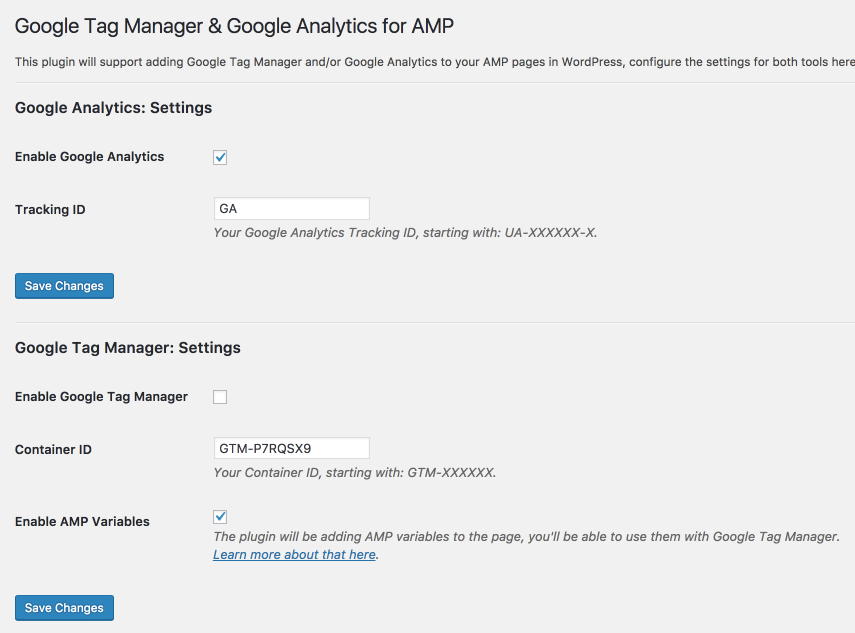
Dashboard settings 
Ynstallaasje
From within WordPress
1. Visit ‘Plugins > Add New’.
2. Search for ‘Google Tag Manager & Google Analytics for AMP’.
3. Activate Google Tag Manager & Google Analytics for AMP from your Plugins page.
4. Go to “after activation” below.
Manually
1. Upload the gtm-ga-wordpress-amp folder to the /wp-content/plugins/ directory.
2. Activate the Google Tag Manager & Google Analytics for AMP plugin through the ‘Plugins’ menu in WordPress.
3. Go to “after activation” below.
Resinsjes
D’r binne gjin resinsjes foar dizze plugin.
Meiwurkers & amp; Untwikkelders
“Google Tag Manager & Google Analytics for AMP” is iepen boarne software. De folgjende minsken hawwe bydroegen oan dizze plugin.
Meiwurkers
Oersette “Google Tag Manager & Google Analytics for AMP” yn jo taal.
Ynteressearre yn ûntwikkeling?
Blêdzje troch de koade , besjoch de SVN-repository , of abonnearje op it ûntwikkelingslogboek troch RSS .
Feroaringslog
1.0.0
- Enable the tracking codes for Google Tag Manager & Google Analytics.
- Provide custom variables and data for AMP.
- Be able to customize the custom dimensions for Google Analytics.
- Add outbound link tracking for Google Analytics.