
Beskriuwing
Harvify Cookie Consent adds a cookie consent banner to your WordPress site: it
asks visitors which cookies they allow, holds back known tracking scripts until
they answer, and keeps a record of each answer. Unlike SaaS alternatives, your
visitors’ consent records are kept in your own WordPress database and are not sent
to any outside service, and there is no monthly fee. The plugin’s only outbound
connection is to Freemius, and only if you opt in or activate a Pro licence — see
External services below.
Free features:
- 8 professional banner templates, all 4 positions (bottom, top, center, corner)
- Full banner customization (colors, logo, text)
- Three-button flow: Accept All / Reject All / Settings
- Cookie categories: Necessary, Analytics, Marketing, Preferences
- Consent logging to your database (GDPR audit trail, SHA-256 IP hashing)
- Geo-targeting (EU, UK, EEA, California, Canada, Brazil): ask for consent only
in the regions you choose. (California asks every visitor from the US: a state
cannot be told from the country.) It needs your host or CDN to pass the visitor’s
country (Cloudflare does this), or a MaxMind GeoLite2 database; when the
country cannot be told, the visitor is asked. - Google Consent Mode v2 (GTM / GA4 / Ads signals)
- Script/tag blocking by category: GA4, Google Ads, the Meta (Facebook) Pixel,
Hotjar, LinkedIn Insight, TikTok, HubSpot and Microsoft Clarity are held until
the visitor allows their category — including the inline tags most of them
install with - Cookie scanner — detect cookies and auto-categorise them against a
known-cookie database - Deep scan across your pages — the scanner crawls the front page, your menu
and the WooCommerce pages rather than checking one page, and reports which
page each cookie was seen on. - Consent statistics — accept/partial/reject rates and per-category opt-in
rates - Cookie declaration table shortcode: [harvify_cookie_declaration]
- Cookie-policy page generator — one click creates a draft cookie-policy
page from your declared cookies, with the declaration table embedded live. It
is a starting template to review and adapt, not legal advice. - Policy version + force re-consent, import/export, preferences modal
- Multi-language via WPML / Polylang
- Vanilla JavaScript — no jQuery dependency, works with any theme
Pro features (included in Harvify Pro Bundle):
- Scheduled automatic cookie re-scans — get emailed when new, undeclared
cookies appear - Advanced consent analytics — historical opt-in/opt-out trends, segmented
by category and region, with CSV export - Consent-record audit export — filterable CSV of individual consent records
(UUID, hashed IP, categories, policy version, timestamps) for compliance /
DSAR proof - White-label — remove the Harvify credit from the admin footer of the
plugin’s own screens - Policy auto-update + versioning — a material data change bumps the policy
version, which re-prompts consent, and rebuilds an unedited page. - Optional weekly consent-summary email
- Multi-language policy generation — generate the cookie-policy page in any
language your site has translations installed for - Custom CSS for the banner
Harvify Pro Bundle:
One subscription unlocks Pro features across all Harvify plugins. The
current price and what it covers are shown on the plugin’s own Plan screen.
Install only the tools your site needs.
Setting up the banner
- Go to Harvify Cookie Consent. The Banner tab opens.
- Choose a template and a position, and adjust the wording if you want to.
- On the Compliance tab, check that Script blocking and Google Consent
Mode v2 are on (they are for a new install), and pick Geo-targeting
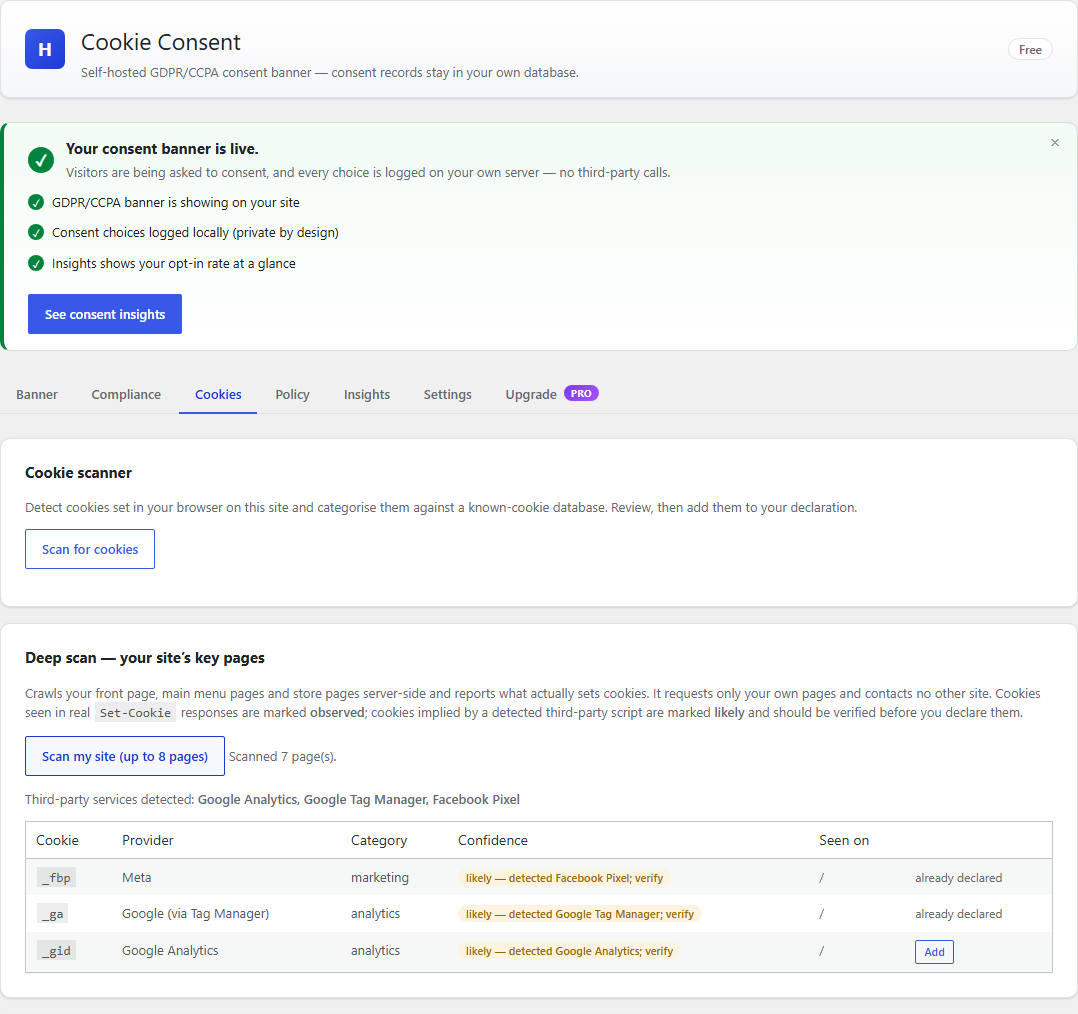
regions if you only want to ask visitors from certain places. - On the Cookies tab, click Scan my site (up to 8 pages), then Add all
observed to declaration, so the declaration table lists your cookies. - Click Save changes on each tab you change.
Visit your site in a private window to see the banner. Accept, reject or choose
settings, and the answer appears on the Insights tab.
External services
This plugin connects to Freemius, the licensing and update service Harvify uses to
sell and deliver the Pro tier of its plugins.
Nothing is sent to Freemius unless you choose to send it. On activation you are shown
Freemius’s standard opt-in screen. Until you answer it a fresh install makes no
outbound request at all, and if you choose Skip the free tier stays fully usable
and still sends nothing. Data is transmitted only when you take one of these
actions:
- You click “Allow & Continue” on the Freemius opt-in screen. This sends your
site address, your administrator email address, and your WordPress, PHP and active
plugin/theme details, so Harvify can provide support and know which environments to
test against. Skipping that screen sends nothing and leaves the plugin working
normally. - You enter a Pro Bundle licence key. This sends the key together with your site
address so the licence can be activated for that site. While a licence is active the
site also re-checks periodically that it is still valid and whether a Pro update is
available.
Service provided by Freemius, Inc. – https://freemius.com/
Terms of service: https://freemius.com/terms/
Privacy policy: https://freemius.com/privacy/
Cookie scanner
The deep scan requests pages on your own site over a loopback connection and reads the
cookies those responses set. It is restricted to your own host and contacts no third
party. The third-party names it reports – analytics, pixels, embeds and similar – are
recognised from markup already present on your pages, not looked up anywhere: the scanner
looks in your pages’ HTML for the addresses those services load from (for example
google-analytics.com, googletagmanager.com, connect.facebook.net, js.stripe.com or
maps.googleapis.com). Those addresses are text it searches for. The plugin never requests
them, and sends nothing to those services.
Script blocking
When a visitor has not consented to a category, the plugin holds back the scripts your
site already loads from services in that category (the same addresses as above), and
releases them in the visitor’s browser only after they consent. The plugin itself loads
no script from any of these services.
Skermôfbyldings



Ynstallaasje
- Upload the plugin to
/wp-content/plugins/or install via WordPress.org. - Activate the plugin.
- The cookie consent banner will appear automatically on your site.
- Configure settings under Harvify Cookie Consent.
FAQ
-
Does this plugin make my site GDPR compliant?
-
It provides the technical mechanism for cookie consent, which is one part of
GDPR compliance. You must also have a privacy policy and cookie policy page.
Consent logging for audit trails is included free. -
Where is consent data stored?
-
Consent preferences are stored in the visitor’s browser cookie and logged to
your own WordPress database for an audit trail. Consent records are never sent to
any outside service. (The plugin’s only outbound connection, to Freemius, happens
only if you opt in or enter a licence key, and carries no consent records — see
External services.) -
Does it work with caching plugins?
-
The consent banner is rendered client-side via JavaScript, so it works with
page caching. The consent cookie is set via JavaScript, not PHP. With
geo-targeting on, the banner asks your server whether each visitor needs to be
asked, so a cached page never hands one visitor’s answer to another. -
Does it work with WooCommerce?
-
Yes. WooCommerce’s default cookies (cart, session) are classified as Necessary.
Resinsjes
D’r binne gjin resinsjes foar dizze plugin.
Meiwurkers & amp; Untwikkelders
“Harvify Cookie Consent” is iepen boarne software. De folgjende minsken hawwe bydroegen oan dizze plugin.
Meiwurkers
Oersette “Harvify Cookie Consent” yn jo taal.
Ynteressearre yn ûntwikkeling?
Blêdzje troch de koade , besjoch de SVN-repository , of abonnearje op it ûntwikkelingslogboek troch RSS .
Feroaringslog
1.0.27
- Changed: requires WordPress 6.9 or later. The bundled Action Scheduler library is
updated to its latest release, 4.2.0, which requires WordPress 6.9. - Changed: script blocking now works through WordPress’s own page output buffer
(added in WordPress 6.9) instead of opening a buffer of its own. - Fixed: activation could not update the consent log table. The table definition
now uses the format WordPress’s table installer reads, so a missing index or column is
added back on activation. - Corrected: the description said no data leaves your site. Your visitors’ consent
records stay in your own database; the only outbound connection is to Freemius, and only
if you opt in or activate a Pro licence (see External services). The readme now also
explains that the third-party addresses the scanner and script blocking recognise are
never contacted by the plugin.
1.0.26
- Fixed: in the corner, the third button ran past the edge of the banner. With
longer button labels “Settings” was drawn outside the box, where it could not be
read. The buttons now wrap inside the banner. - Fixed: the Fullscreen template showed its title at the top of the screen and
its buttons half a screen below. The message and its buttons now sit together
in the middle. - Fixed: on phones every banner had a large empty space between its words and its
buttons, and took up most of the screen. The corner and centered banners now fit
the width of the phone. - Fixed: on themes that pad every button (Storefront among them) the preferences’
close button was stretched wide, with the × in one corner of it.
1.0.25
- Fixed: script blocking held only tags loaded with a
src. The Meta Pixel,
Hotjar, LinkedIn, TikTok and Microsoft Clarity install as inline scripts that add
the vendor’s file themselves, and all five loaded before the visitor chose
anything. Every script is now judged by what it loads, inline or not. - Fixed: Google Ads was treated as analytics, so it loaded for a visitor who
allowed analytics only. A gtag.js tag with anAW-id is advertising. - Fixed: the banner’s text colour. The title and description ignored it, so a
light banner showed white text on white. The Settings link now uses it too. - Fixed: saving the Banner tab turned a transparent Reject button black.
- Fixed: the preferences. Save Preferences now closes them; they can be closed
without saving (Escape or the close button); keyboard focus moves into them and
stays there while they are open. - Fixed: the button to change a choice now appears as soon as the choice is
made, not on the next page. - Fixed: the Minimal template hid the Reject button. Every template now shows
Accept, Reject and Settings. The Top Bar template now sits at the top, and the
Fullscreen template’s description no longer promises categories it does not show. - Fixed: the banner linked to the cookie-policy page while it was still a
draft, so visitors got a “not found” page. It links the page once you publish it. - Fixed: removing a cookie from the declaration and adding another could lose a
third. - Fixed: a save or an import the server refused was reported as done. The
screen now says it failed, and why.
1.0.24
- Consent is now recorded. The banner was never told where to send a
visitor’s choice, so the consent log — and the consent statistics built on it
— stayed empty for real visitors. A visitor who changes their mind now updates
their record instead of adding a new one. - Geo-targeting works. The regions could be chosen but were never applied.
Visitors outside the chosen regions now see no banner and nothing is blocked
for them; a visitor whose country cannot be told is always asked. The settings
screen shows whether your server can tell visitors’ countries. - The Script blocking and Google Consent Mode switches now do what they say.
Both features used to run whatever the switches said. A new install has both
on; an existing site keeps the setting it saved. - Fixed: the server never recognised a visitor’s consent. PHP changes the
“.” in the consent cookie’s name, so the plugin looked for a cookie that never
arrives, and script blocking kept holding back a visitor’s scripts on every
page even after they accepted. - Fixed: scripts held back by script blocking now run once the visitor
consents. A released script kept the “do not run” type it was held back
with, so it never ran. - Fixed: Google Consent Mode’s “denied” defaults now reach the page. They
were added too late in the page head and were never printed. Visitors outside
your geo-targeting regions are not sent them. - Fixed: banner text could not be translated with WPML or Polylang — the
translation file pointed at a setting that did not exist. - Pro: scheduled re-scans and the weekly summary now run. They were being
rescheduled on every page view, so they never came due. - Settings import is checked field by field, like a normal save.
- Internal names now start with
harvify_cookie_instead ofhcc_, as
WordPress.org requires. Your settings, policy page and scheduled jobs are
carried across automatically, and[hcc_cookie_declaration]becomes
[harvify_cookie_declaration] (the same table) in your pages and widgets, and
— in the background, a little at a time — in page-builder data such as
Elementor’s. Nothing to change by hand. - Custom CSS is now part of Pro, as is generating the policy in another
language. CSS you already saved is kept: with a Pro licence it keeps working,
and without one it is stored but not added to the banner. - Freemius now asks before connecting. On activation you see Freemius’s
standard opt-in screen with a Skip button; skipping sends nothing and the
plugin works as before. - Readme: setup steps, and wording that describes what the plugin does rather
than promising compliance.
1.0.21
- Added: a single Support entry in the Harvify menu, so you can reach us from
inside WordPress. Until now no plugin offered a contact route at all. One entry for
the whole suite rather than one per plugin. - No behaviour changes.
1.0.20
- Added: an External services section to this readme, naming every third-party
service the plugin can contact, exactly what is sent, when, and each provider’s terms
and privacy policy. Required for WordPress.org submission. - Changed: the
Contributorsfield now names the correct WordPress.org account. - No behaviour changes.
1.0.19
- Fixed: deactivating the plugin now cancels the scheduled cookie re-scan and the
weekly summary. They were left queued, so they went on firing against a plugin
that was switched off — doing nothing, but filling the Scheduled Actions log
with failures.
1.0.18
- Changed: the readme no longer quotes a fixed subscription price. What the bundle
costs and what it covers are shown on the plugin’s own Plan screen, which is the
one place that stays correct when pricing changes.
1.0.17
- Added: a single Manage licence link on the Plan screen, so an active customer can
deactivate this site, change their licence key or re-check their licence without
needing a URL from support. No per-plugin Account tab is added.
1.0.16
- Fixed: opting in to “delete all data on uninstall” now removes hcc_db_version.
It was written at runtime but never included in the cleanup, so a user who
asked for their data to be deleted kept it.
1.0.15
- Fixed: updating the plugin did not update its database. WordPress only runs a plugin’s
setup routine when you activate it, never when it updates – so a change to the plugin’s own
tables never reached sites that had simply updated. On those sites some features failed with a
database error. The update now applies itself on the next page load. - One upgrade link instead of one per plugin. With several Harvify plugins active the
menu showed a row called “Upgrade” for each of them, all identically labelled, and it kept
saying Upgrade to people who had already bought. They are replaced by a single Plan
screen that says what the bundle costs, what it covers, and whether your licence is active. - The dashboard is quiet again. Each plugin used to add its own “opt in to make this
better” notice to the main WordPress dashboard, so five plugins meant five notices. Harvify
plugins now share one queue: promotional notices appear only on Harvify’s own screens, and
only one at a time. Licence and account messages are never held back. - Fixed: the “Data & uninstall” box covered the page. It was being drawn into the admin
footer, which WordPress pins to the bottom of the screen, so it floated on top of whatever was
underneath it. It now sits in the page like any other card. Saving it also tells you what it
saved, instead of just reloading. - Fixed: the upgrade screen advertised the wrong number of sites. Several plugins listed
the Freelancer and Agency plans as covering 5 and 25 sites. They cover 3 and 10.
1.0.14
- The plugin ZIP no longer carries the shared packages’ own unit tests. A stale
tests/
directory had been committed insidevendor/harvify/, and the packager copied it straight
into the download. Nothing executable changed; the artifact is smaller and cleaner. - Deleting the plugin left its database tables behind, on every site, since 1.0.0. The main
plugin file used a variable named$filewhile loading its includes. WordPress runs
include_once on that file from INSIDE its ownuninstall_plugin()function, so the
assignment overwrote WordPress’s$file; core then fired its uninstall action under a nonsense
name, the cleanup callback was never reached, and the plugin’s tables, options and scheduled
events survived deletion forever. The loader variable is now prefixed. - The public “Powered by Harvify” credit is gone from the cookie banner. WordPress.org
requires a front-end credit to be off by default and opt-in, and a credit that is off by
default cannot be sold as a Pro removal — so the line is removed from the product rather than
defaulted off, along with thehcc_banner_creditfilter. White-label (Pro) is unchanged in
value and now targets the ADMIN FOOTER credit on the plugin’s own screens: admin-only agency
de-branding for client handover, with no public surface. - The published free ZIP would have failed Plugin Check even though the source passes.
Freemius’s code preprocessor rewrites the main plugin file and drops block comments that sit
inside an expression, which deletes atranslators:comment and produces a
MissingTranslatorsComment ERROR in the artifact. The comment now sits above a statement.
1.0.13
- Fixed (Pro): the policy version did not bump on a site’s very first save. Auto-update
listened only for changes to an existing settings record, and WordPress signals the first save
differently — so the one save where the bump matters most was missed. Because the consent
cookie name embeds the policy version, that meant returning visitors were not re-prompted
after the policy changed. - A drill now proves it in the failure direction: it deletes the settings record so the next
write really is a first save, and reproduces the old behaviour by unhooking the fix.
1.0.12
- Removed the “IAB TCF v2.2 (coming soon)” line from the Pro feature list. The feature is
deferred for a genuine external cost and has no delivery date, so listing it read as a
promise we were not keeping. Nothing else changed; no feature was removed.
1.0.11
- Harvify Tools now opens with a Your licences table: every installed Harvify plugin,
the plan it is on, whether Pro features are actually running, and a link to its Account screen.
Freemius gives each product its own separate Account page, so this is the one place that
answers “what am I on” across the whole bundle. - The repeated “Opt in to make … better!” admin notice no longer appears. Licence, plan and
update notices are unaffected — only the opt-in prompt is suppressed.
1.0.10
- Change: License activation now uses per-plugin key entry — enter your bundle license key on each Pro plugin to unlock Pro. Improves activation reliability.
1.0.9
- New: deep scan (free) — crawls your site’s key pages (front page, main-menu pages, WooCommerce shop/cart/product; up to 8) entirely server-side and reports what sets cookies. Nothing leaves your server. Findings are honestly labeled: cookies seen in real Set-Cookie responses are “observed”; cookies implied by a detected third-party script (Google Analytics/Tag Manager, Facebook Pixel, YouTube, Hotjar, reCAPTCHA, Stripe, PayPal, TikTok, LinkedIn, X, Google Maps) are “likely — verify” and are never bulk-added: “Add all” adds observed cookies only, likely ones need per-row confirmation. Each finding shows which pages it was seen on; one click adds it to the declaration.
- Improved (Pro): the scheduled auto-scan now uses the same multi-page crawl engine for its new-undeclared-cookie email alerts (environment inference remains as fallback).
1.0.8
- New: cookie-policy page generator (free). One click creates a draft cookie-policy page built from your declared cookies, categories, regions and (optional) business details — with the declaration table embedded as the live [hcc_cookie_declaration] shortcode so it never goes stale, and a “Manage cookie preferences” button that reopens the consent banner. The page is a clearly-labeled customizable starting template (not legal advice — review it for your jurisdiction); regenerating warns before replacing a page you have edited.
- New (Pro): generate the policy in any language your site has translations installed for, and optional auto-update — a material change to your cookie data bumps the policy version (visitors are re-asked for consent) and rebuilds the page unless you have hand-edited it.
1.0.7
- New admin design system (Harvify Admin Kit): branded header, first-run onboarding, section navigation (Banner, Compliance, Cookies, Insights, Settings), skeleton loaders, coaching empty states, a consent Insights panel (consents logged, opt-in rate, per-category opt-ins), and a contextual, dismissible upgrade card. UI layer only — the banner, consent logging, compliance features and free/Pro gating are unchanged.
1.0.6
- Fix: Pro features now unlock only on the premium build with a valid license (per-plugin gate). Previously a shared bundle flag could make the free build report Pro when another Harvify plugin was licensed.
1.0.5
- Internal: uninstall cleanup now runs on Freemius’s after_uninstall hook (removed uninstall.php) for Freemius Deployment compatibility. What gets removed on uninstall is unchanged.
1.0.4
- New Pro tier (Harvify Pro Bundle): scheduled automatic cookie re-scans with email alerts on newly detected cookies; advanced consent analytics (historical trends + per-region segmentation + CSV); consent-record audit export (CSV) for compliance/DSAR; white-label to remove the banner/admin credit; optional weekly consent-summary email.
- Consent records now capture a best-effort country (for the Pro region analytics) and are covered by the WordPress privacy exporter/eraser.
- The free tier is unchanged — all existing free features remain free.
1.0.3
- Added a cookie scanner: detect cookies on your site and auto-categorise them against a known-cookie database, then add them to the declaration in one click.
- Added consent statistics: accept / partial / reject rates and per-category opt-in rates, aggregated from your local consent log.
1.0.2
- Admin menu now registers on init (fixes a “translation loaded too early” notice under WordPress 6.7+).
1.0.1
- Free tier now includes consent logging, geo-targeting, Google Consent Mode v2, script blocking, 8 templates, and full customization (previously listed as Pro). IAB TCF v2.2 is the only Pro feature (coming soon).
- Removed the unused pro/templates.php stub.
- Pricing now sourced from the shared bundle-license package; upgrade prompts link to the pricing page.
1.0.0
- Initial release.
- Consent banner with Accept All / Reject All / Settings flow.
- Cookie categories: Necessary, Analytics, Marketing, Preferences.
- Browser cookie storage.
- Admin settings page.
- Harvify Tools integration.