

Beskriuwing
Find WooCommerce reviews that need attention, and keep a clear record of how they were checked.
Synth Review Integrity brings review history, order-match results and documented decisions into one dashboard. Use it to investigate unfamiliar review batches, check verified-owner claims and hand cases to the right person.
Once connected, it records product reviews and their changes in the background. It never changes, publishes or deletes reviews, orders, coupons or ratings.
Findings highlight records to investigate. The plugin does not determine whether a review is fake.
Why Synth Review Integrity exists
When someone questions a review, your shop needs a clear record of what was checked and how the issue was handled.
Rules for consumer reviews differ by market. In the EU, shops displaying product reviews must explain whether and how they check their origin. Presenting reviews as coming from buyers or users requires reasonable, proportionate checks. Rules in the US, Australia and New Zealand also address misleading review practices.
Synth automates specific checks, records review changes and keeps findings and decisions together. You can export available records to help respond to a complaint or regulatory inquiry. It supports your review-handling process; it does not guarantee legal compliance.
Official guidance: EU, US, Australia, New Zealand.
How you use it
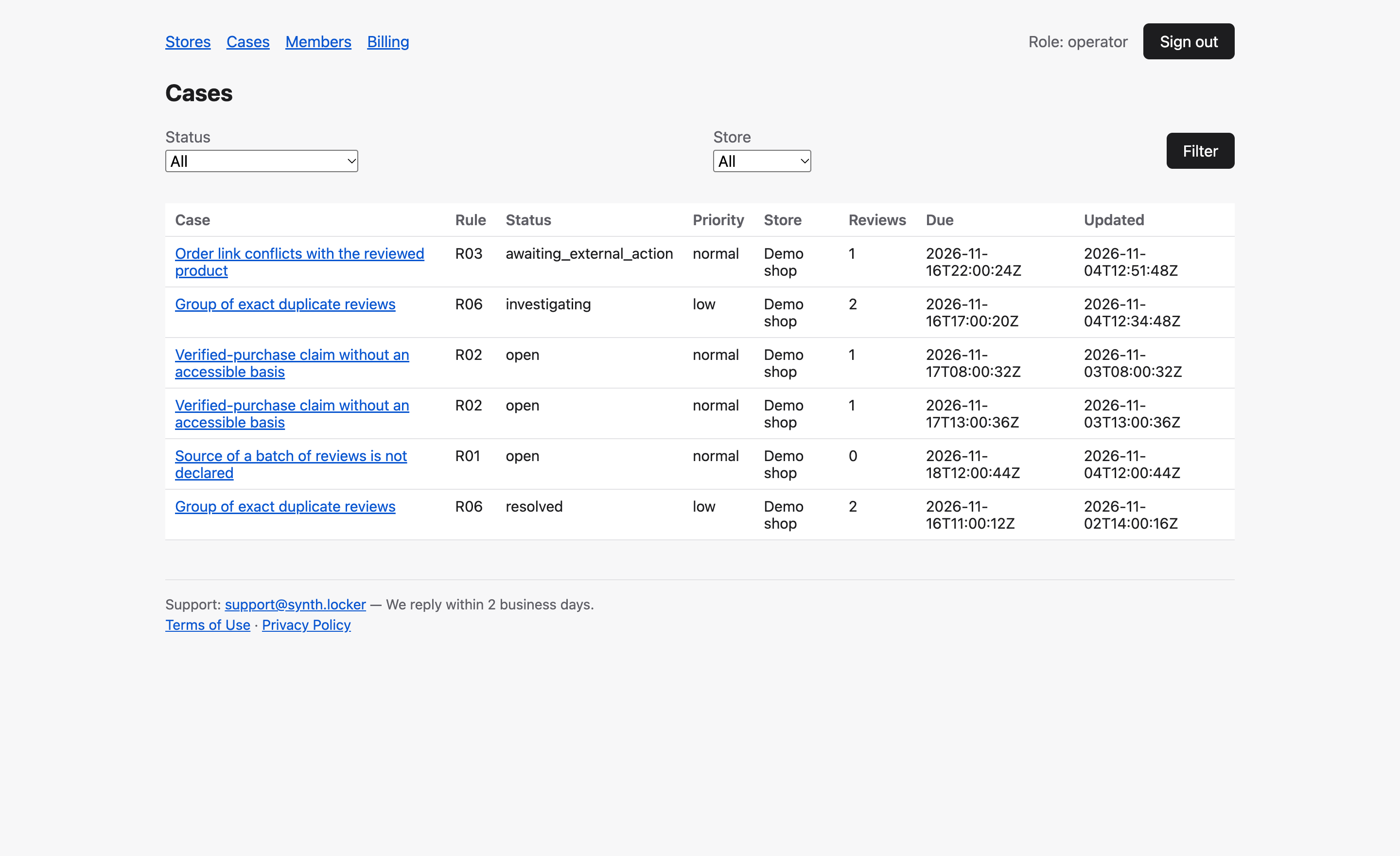
Your usual WordPress moderation remains in place. Findings become cases in the dashboard. Make corrections in WordPress; when the dashboard sees that the issue is fixed, the case closes as fixed at the source. Checks and decisions stay on record.
What it checks
- A batch of reviews whose source is unknown, such as an import — one case per batch.
- A “verified owner” mark without a matching purchase on this site.
- A review that Customer Reviews for WooCommerce links to an order without the reviewed product.
- Exact duplicates of a long review text within your shop.
- A review that changed after a check: earlier results become outdated and the review is checked again.
- Gaps in what the dashboard knows about your shop — reported once per period.
- A review already identified as an ad by Synth Antispam. Its verdict is reused without checking the text again; this check needs Synth Antispam on the same site.
Order matching happens on your site, through WooCommerce. The service receives the match result and a pseudonym of the order. Order numbers, order contents and customer details stay on your site.
The dashboard
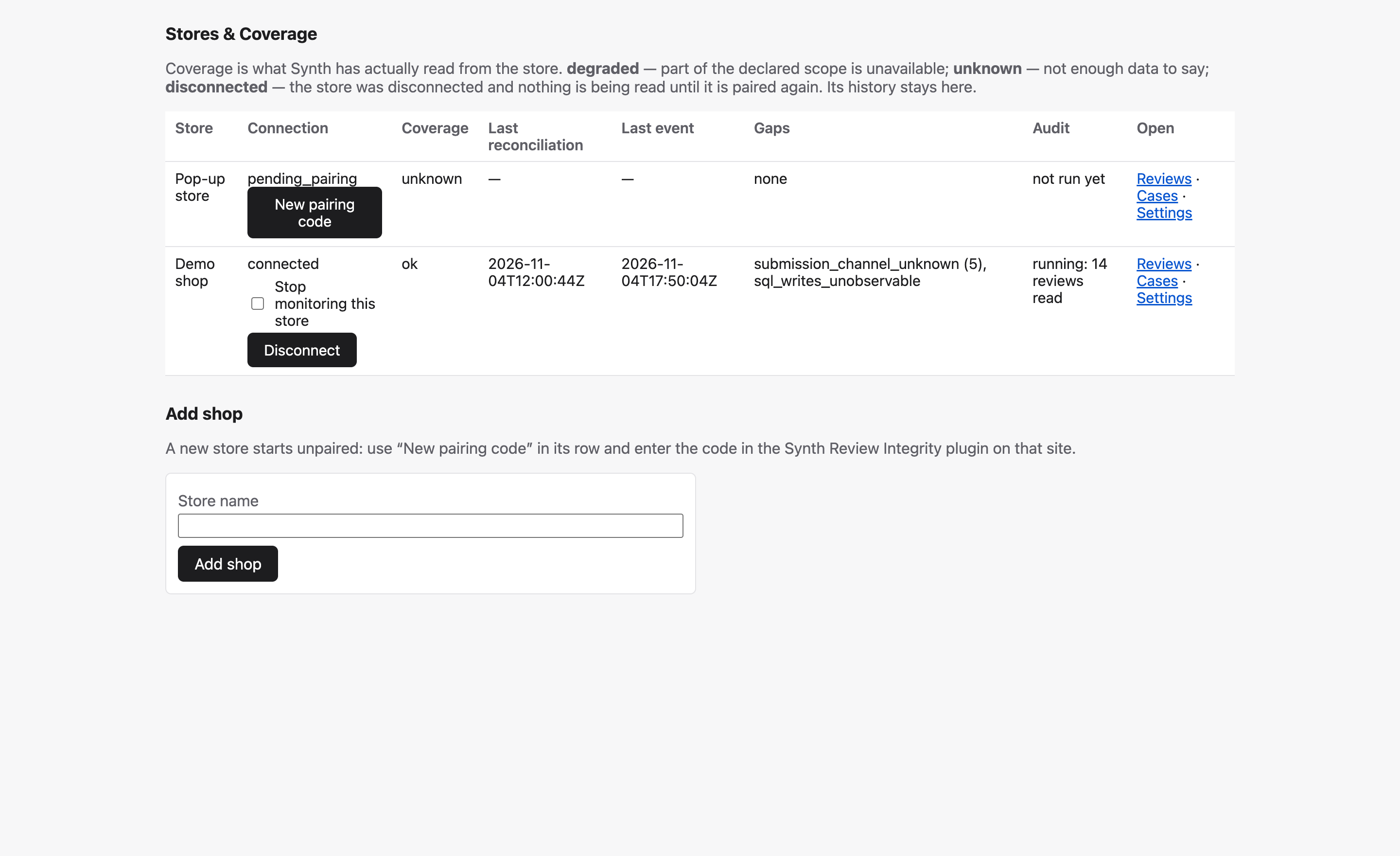
- Stores & Coverage — see how complete and fresh each shop’s data is.
- Reviews — inspect a review’s versions and check results, then open it in your WordPress admin.
- Cases — assign, add notes, resolve with a reason, dismiss, reopen and recheck.
- Members — invite people by email as Owner, Operator or Viewer. Sign-in uses a one-time email link; there are no passwords.
- Export — download a ZIP of reviews, checks and history, with a manifest of checksums.
Privacy
- By default, only facts and keyed one-way digests leave the site. Reviewer names, email addresses, websites and IP addresses never do.
- Review text is sent only if the workspace owner enables content consent in the dashboard.
- Connecting a shop excludes its domain from Synth Antispam training copies, including Antispam checks on that site. Disconnecting does not reverse this.
- The plugin sends nothing while a visitor is submitting a review.
The “External services” section below lists what is sent, when, and how long it is kept.
Requirements
- WooCommerce. Without it, the plugin records and sends nothing.
- A workspace at reviews.synth.locker. Creating one takes an email address and costs nothing. What it includes — how many shops, continuous tracking of new reviews and rechecks — is shown in the dashboard.
- Synth Antispam is optional. It is recommended for the ad-review check and is not required for the other checks.
External services
This plugin needs the Synth Review Integrity service (wp-api.synth.locker, operated by LightApps OÜ, Estonia). Once an administrator activates the plugin, gets a site key and connects the shop to the Synth Review Integrity dashboard with a pairing code, the plugin records how WooCommerce product reviews are created, edited and moderated, reads WooCommerce orders locally on this site to check whether a reviewer bought the product and, when Customer Reviews for WooCommerce links a review to an order, whether that order contains the reviewed product, and sends only the resulting facts to the service. The text of a review is sent only if the shop owner has enabled content consent in the Synth Review Integrity dashboard, and only for review versions the plugin records after it was enabled (a new or changed review, or a scan the dashboard asks for); turning the consent off stops new transfers. Orders are read on this site only; what leaves it is the fact of a match and a pseudonym of the order — and, for a linked order, only whether it contains the product, never its number. Until the shop is connected, the plugin sends nothing except the two requests an administrator makes by pressing a button on its screen — Get a site key and Connect — and nothing is ever sent while a visitor is submitting a review: sending happens later, in the background.
Requests the plugin makes
Every request below carries the plugin version and WordPress’s own User-Agent header; all except POST /v1/register also carry the site key and, in a separate header, the site address. POST /v1/register carries instead the plugin’s name (X-Synth-Product: review-integrity), so the service can tell this plugin’s site keys from Synth Antispam’s — nothing about the site.
POST /v1/register— only when an administrator presses Get a site key on the plugin’s screen; asks the service for this plugin’s own site key with an empty body — no site key and no site address header. The key is tied to this site’s address by the first request made with it (connect).POST /v1/integrity/connect— only when an administrator presses Connect with a one-time pairing code from the dashboard; sends the code, a random identifier of this installation and the capability snapshot.POST /v1/integrity/events— in the background while the shop is connected; sends up to 50 review events at a time.POST /v1/integrity/status— in the background, at most once every 15 minutes; sends the capability snapshot and the state of the local queue, and receives scan jobs.POST /v1/integrity/scan/page— in the background, only while the dashboard has asked for a scan or a recheck; sends review snapshots page by page.POST /v1/integrity/erasure— in the background, only after the shop owner erases a person’s personal data with the WordPress privacy tools (Tools Erase Personal Data); sends the numbers of that person’s product reviews on this site, found here by the email address, and a random request id — never the email address itself.
Exactly what is sent, field by field. The complete list, matching the plugin’s request builders:
request.connect.pairing_code— the one-time pairing code.request.connect.store_instance_id— a random identifier of this installation.request.connect.capabilities— the capability snapshot (fields below).request.events.store_instance_id— the installation identifier.request.events.events— up to 50 review events (fields below).request.status.store_instance_id— the installation identifier.request.status.capabilities— the capability snapshot (fields below).request.status.outbox— the state of the local queue (fields below).request.status.active_job_id— the scan job in progress, if any.request.scan_page.store_instance_id— the installation identifier.request.scan_page.job_id— the scan job the page belongs to.request.scan_page.after_cursor— the last review number of the previous page.request.scan_page.next_cursor— the last review number of this page.request.scan_page.done— whether the job is finished.request.scan_page.events— up to 50 review snapshots (fields below).request.erasure.store_instance_id— the installation identifier.request.erasure.request_id— a random identifier of the erasure request, so it is never recorded twice.request.erasure.review_refs— the numbers on this site of up to 100 product reviews of the person; never the person’s email address.event.event_id— an identifier of the event, so it is never recorded twice.event.store_instance_id— the installation identifier.event.sequence— the order in which this installation recorded its events.event.kind— insert, edit, status, delete or observed.event.capture— whether the change was seen by a hook, the daily reconciliation or a scan.event.scan_job_id— the scan job, for a scan snapshot.event.source_system— alwayswoocommerce.event.review_ref— the review’s number on this site.event.product_ref— the reviewed product’s number on this site.event.submission_channel— product page, admin, REST API, import or unknown.event.channel_basis— what that channel was determined from.event.observed_at— when the plugin saw the change.event.source_created_at— the review’s creation date as stored.event.source_occurred_at— when the change happened, where WordPress stores it.event.source_updated_at— always empty for WooCommerce.event.status— approved, held, spam, trash, deleted or absent.event.prior_status— the status before a status change.event.rating— the star rating.event.content_digest— a keyed one-way digest of the review text; without content consent the text never leaves the site.event.version_digest— a keyed one-way digest of text, rating and status together.event.digest_scheme— how the text was normalised before digesting.event.normalized_length— the length of the review text.event.text— the review text, only while the shop owner has enabled content consent in the Synth Review Integrity dashboard and only for versions captured after it was enabled; at most 8 KB; never with a deletion or a status change.event.purchase.state— whether a matching order was found on this site.event.purchase.method— whether the match used the customer account or the order’s email address.event.purchase.product_match— the product itself or one of its variations.event.purchase.order_ref— a keyed pseudonym of the order, never the order number.event.purchase.order_status_class— completed, in progress, refunded, cancelled, failed or other.event.purchase.refunded— whether the order was refunded.event.purchase.orders_examined— how many of that customer’s orders were examined.event.purchase.orders_limit— the most orders examined per customer.event.provider_facts.verified— WooCommerce’s own “verified owner” mark, as stored.event.provider_facts.verified_source— where that mark was read from.event.provider_facts.ivole_order_kind— which order link Customer Reviews for WooCommerce stored, if any — never the order number.event.antispam_verdict.state— whether Synth Antispam already judged the review.event.antispam_verdict.is_spam— its verdict.event.antispam_verdict.category— its category.event.antispam_verdict.outcome— what was done with the review.event.order_link.state— whether the order Customer Reviews for WooCommerce links the review to was found on this site and contains the reviewed product; checked on this site, never the order number or its contents.event.order_link.kind— which order link of Customer Reviews for WooCommerce was checked, if any.event.order_link.product_match— the product itself or one of its variations.capabilities.captured_at— when the snapshot was taken.capabilities.wp_version— the WordPress version.capabilities.php_version— the PHP version.capabilities.wc_version— the WooCommerce version.capabilities.hpos— whether WooCommerce stores orders in its own tables.capabilities.action_scheduler_version— the Action Scheduler version.capabilities.wp_cron_disabled— whether WP-Cron is switched off.capabilities.digest_scheme— how review text is normalised on this host.capabilities.cusrev_version— the Customer Reviews for WooCommerce version, if active.capabilities.product_comments_non_review_type— how many comments on products are not reviews and are therefore not recorded.outbox.pending— how many events wait to be sent.outbox.oldest_pending_age_s— how long the oldest of them has waited.outbox.dropped_total— how many were deleted unsent after 7 days.outbox.last_reconciliation_at— when the last daily reconciliation for the current connection finished (empty right after connecting, until the first one does).outbox.paused_reason— why sending is paused, if it is.
What is never sent: reviewer name, reviewer email address, reviewer website, reviewer IP address, order number, order contents, amounts, addresses.
Sent only with the shop owner’s consent: review text — only while the shop owner has enabled content consent in the Synth Review Integrity dashboard, and only for versions captured after it was enabled.
Retention on this site: events wait in a local table and are deleted 7 days after they were recorded, sent or not; the number deleted unsent is reported (outbox.dropped_total) so the gap is visible. An erasure request is the exception: it is kept until it is sent — while the shop is disconnected it waits for the shop to be reconnected — and is then deleted like the rest. Uninstalling the plugin removes the table and the per-site secret behind every pseudonym and digest, after which earlier pseudonyms can no longer be linked to anything on this site.
Training: nothing this plugin sends is used to train models. Connecting the shop also excludes its domain from the copies the Synth Antispam service keeps for training: from then on, checks made for that domain — including those of Synth Antispam on this site — are not kept. Disconnecting the shop does not undo this. Copies taken before the shop was connected are deleted on request: write to support@synth.locker with the site address.
- Terms of Use: https://synth.locker/assets/legal/wordpress-terms-of-use.html
- Privacy Policy: https://synth.locker/assets/legal/wordpress-privacy-policy.html
Every address that appears in the source
A search of this plugin’s files finds these addresses and no others:
wp-api.synth.locker— the Synth Review Integrity service above; changeable only with theSYNTH_RI_API_BASEconstant inwp-config.phpor thesynth_ri_settingsfilter. The only address this plugin sends a request to.reviews.synth.locker— the Synth Review Integrity dashboard, where pairing codes are issued: a link on the plugin’s settings screen. Nothing is sent to it.wordpress.org— a link to Synth Antispam on the plugin’s settings screen, shown while Synth Antispam is not installed, and the support forum in the translation template. Nothing is sent to it.synth.locker,www.gnu.organdfsf.org— links (the plugin’s home page, the terms and the privacy policy above, the GPL licence). Nothing is sent to them.support@synth.locker— the email address for deletion requests.- Not addresses: the translation-template placeholder
LL@li.org;localhost,127.0.0.1and the.test,.localand.localhostendings, by which the plugin recognises a development address of the service and allows it without HTTPS; anda@b.test, an example inside a code comment. None of them is contacted.
Skermôfbyldings



Ynstallaasje
- Install from Plugins Add New (search “Synth Review Integrity”) and activate. WooCommerce must be active.
- Go to Settings Synth Review Integrity and press Get a site key, or paste a key you already have.
- Open the Synth Review Integrity dashboard at https://reviews.synth.locker/, enter your email address and press Email me a link. The link in the email opens a page with a Create workspace button; the new workspace comes with a first shop waiting to be connected.
- In the shop’s row press New pairing code (the workspace owner can). The code works once and expires after 30 minutes.
- Back in Settings Synth Review Integrity, paste the code and press Connect.
- To check the reviews the shop already has, press Run audit in the shop’s row of the dashboard.
FAQ
-
Does it change, publish or delete my reviews?
-
No. It reads reviews, orders, coupons and ratings and never changes them. You fix a review in WordPress as usual; the dashboard then sees the fix.
-
Does it slow down the review form?
-
No. While a visitor submits a review, the plugin only writes a row to a table on this site. Sending happens later, in the background.
-
Is the text of the reviews sent?
-
Only if the workspace owner turns on content consent in the dashboard, and only for reviews recorded after that. Without consent the service receives a keyed one-way digest of the text: enough to find exact duplicates, but it cannot be turned back into the text.
-
Do I need Synth Antispam?
-
No. Synth Review Integrity works on its own. With Synth Antispam on the same site, its verdict is used to flag reviews that are ads; without it, that one check is not made.
-
Does Synth Review Integrity decide whether a review is fake?
-
No. It shows facts — where a review came from, whether it matches an order, whether it changed — and the checks that call for attention. The decision is yours, and every action in the dashboard is recorded.
-
Which reviews does it cover?
-
WooCommerce product reviews, including those collected by Customer Reviews for WooCommerce. Comments on posts and other kinds of comments are not recorded.
-
How do I erase a reviewer’s data?
-
Use Tools Erase Personal Data in WordPress with the reviewer’s email address. The plugin finds that person’s product reviews on this site and asks the service to erase them; only the numbers of the reviews are sent, never the email address. If the shop is disconnected at that moment, the request waits on this site and is sent as soon as the shop is connected again. The dashboard has no erase button; if you cannot reconnect the shop, write to support@synth.locker with the review numbers.
-
What happens when I disconnect the shop or uninstall the plugin?
-
The workspace owner disconnects a shop in the dashboard. Its history stays there, and a new pairing code connects it again. Disconnecting does not lift the exclusion of the shop’s domain from the training copies of Synth Antispam. Uninstalling the plugin deletes its table and the per-site secret behind every pseudonym on this site; the site key is kept, so reinstalling does not need a new one.
-
Who sees the data in the dashboard?
-
Members of your workspace, each with one of three roles: Owner, Operator or Viewer. Review text, when it is sent, is shown only to Owners and Operators.
Resinsjes
D’r binne gjin resinsjes foar dizze plugin.
Meiwurkers & amp; Untwikkelders
“Synth Review Integrity” is iepen boarne software. De folgjende minsken hawwe bydroegen oan dizze plugin.
Meiwurkers
Oersette “Synth Review Integrity” yn jo taal.
Ynteressearre yn ûntwikkeling?
Blêdzje troch de koade , besjoch de SVN-repository , of abonnearje op it ûntwikkelingslogboek troch RSS .
Feroaringslog
0.1.1
- Settings screen guides through the three steps (site key, pairing code, audit), shows the audit’s progress and explains the sending state in plain words.
0.1.0
- First release.